> ## Documentation Index
> Fetch the complete documentation index at: https://docs.usedatabrain.com/llms.txt
> Use this file to discover all available pages before exploring further.
# Security & Compliance
> How DataBrain keeps your data secure and helps you meet compliance requirements
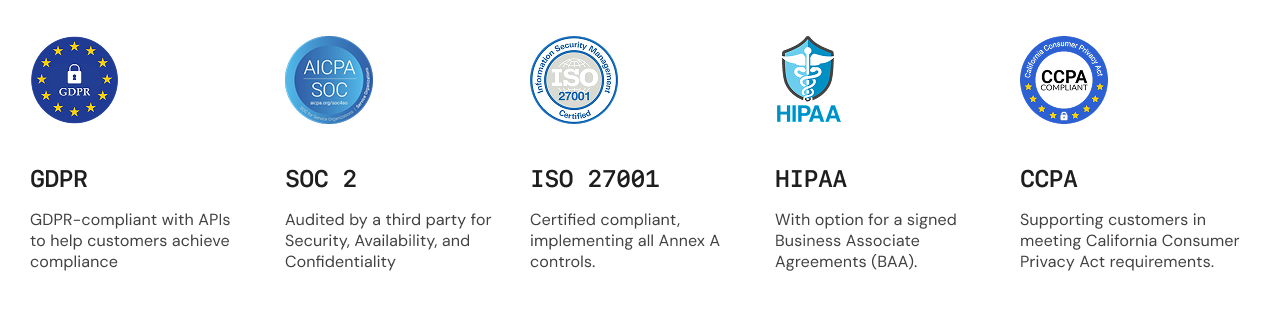
**At a Glance:** DataBrain uses bank-level AES-256 encryption, supports enterprise SSO and MFA, provides fine-grained access controls, and maintains SOC 2 Type II, ISO 27001, GDPR, and HIPAA compliance.
DataBrain implements comprehensive security measures across every layer to protect your data, users, and platform. Security is built into our DNA so you can focus on building great analytics with confidence.
For detailed security information, visit our [Security page](https://www.usedatabrain.com/security).
***
## Compliance & Certifications
DataBrain Cloud is certified and compliant with major security and privacy standards:
 **Self-Hosted Deployments:** Compliance depends on your infrastructure configuration. DataBrain provides all the security features and controls needed to achieve these compliance standards.
**Related Resources:**
* [Security Overview](https://www.usedatabrain.com/security)
* [Privacy Policy](https://www.usedatabrain.com/privacy)
* [Cookie Policy](https://www.usedatabrain.com/cookie-policy)
***
## Data Protection
### Encryption - Bank-Level Security
**Industry Standard:** We use the same AES-256 encryption used by banks and government agencies to protect your data.
**Everything is encrypted when stored:**
* User credentials and passwords (hashed and salted)
* Database connection strings and credentials
* API keys and authentication tokens
* Dashboard and metric configurations
* Audit logs and activity records
Your data is encrypted on disk, in backups, and in our databases. Even if storage media is compromised, data remains protected.
**All communications are encrypted:**
* Login and authentication requests
* Dashboard and metric data transfers
* API requests and responses
* File uploads and downloads
* WebSocket connections for real-time updates
We enforce HTTPS for all connections and use TLS 1.2 or higher with strong cipher suites.
**Your passwords are never stored in plain text:**
* One-way hashing using industry-standard algorithms
* Unique salt per password (even identical passwords have different hashes)
* Cannot be decrypted by anyone, including DataBrain staff
* Password resets create new passwords rather than retrieving old ones
This means your password is secure even if our database is compromised.
### Database Connection Security
**All database connections are encrypted:**
* PostgreSQL, MySQL, SQL Server with SSL/TLS
* Snowflake and BigQuery (encrypted by default)
* Redshift, Databricks, and all supported databases
DataBrain automatically uses encrypted connections when available.
**For maximum security on AWS:**
* Direct private connection to your VPC
* No public internet exposure required
* Network-level isolation
* Lower latency, higher security
Your database doesn't need a public IP address with VPC peering.
**Best practice for analytics:**
* DataBrain only needs SELECT permissions
* No risk of data modification
* Access limited to specific schemas/tables
* Easy to audit and revoke if needed
Create a dedicated read-only database user for DataBrain.
### Multi-Tenant Data Isolation
Complete data separation for SaaS applications and multi-client environments:
Users see only their authorized data
Applied automatically to all queries
Complete separation by client ID
**In a SaaS application:**
1. Generate guest token with unique client ID
2. DataBrain automatically filters all data by that client
3. Client A sees only Client A's data
4. Client B sees only Client B's data
5. Zero cross-client data access - complete isolation
**No code changes required** - filtering happens automatically at the database level.
**Fine-grained data access control:**
* Filter data based on user attributes (role, department, region, etc.)
* Applied automatically to all queries
* Transparent to end users
* Centrally managed and configured
Perfect for hierarchical access (managers see team data, directors see department data, etc.)
***
## User Authentication
Choose the authentication method that fits your security requirements:
Traditional authentication with strong password policies and account protection
Enterprise SSO with SAML, OIDC, Google Workspace, and Microsoft 365
Passwordless authentication via secure email codes
Additional security layer with authenticator apps, SMS, or email
### Single Sign-On (SSO)
Connect DataBrain with your existing identity provider for centralized user management:
**Enterprise Identity Providers:**
* Okta
* Azure Active Directory
* OneLogin
* Auth0
* Any SAML 2.0 compliant provider
Perfect for large organizations with existing identity infrastructure.
**Modern OAuth 2.0 Providers:**
* Keycloak
* Google Workspace
* Microsoft Identity Platform
* Any OpenID Connect provider
Simpler setup with JSON-based token format and better mobile support.
**One-Click Sign-In:**
* Google Workspace integration
* Microsoft 365 connectivity
* Azure AD support
* Automatic user provisioning
Quick setup with popular enterprise platforms.
### Multi-Factor Authentication (MFA)
**Highly Recommended:** Enable MFA for all administrator accounts. MFA blocks 99.9% of automated attacks.
**Time-based one-time passwords (TOTP):**
* Google Authenticator
* Microsoft Authenticator
* Authy
* Any TOTP-compatible app
Works offline and can't be intercepted. **This is the most secure option.**
**Receive verification codes via text:**
* Works on any mobile phone
* No app installation required
* Good for occasional use
More convenient but less secure than authenticator apps.
**Get verification codes via email:**
* No additional device required
* Good for backup method
* Delivered to your registered email
Convenient option for secondary authentication.
### Session Management
Automatic session security keeps your account protected:
Sessions automatically refresh while you're active - no interruptions to your work.
Automatic logout after 30 minutes of inactivity protects your account on shared devices.
Stay logged in on trusted devices for up to 7 days (optional feature).
**Important:** Don't use "Remember Me" on public or shared computers.
View and manage active sessions across all your devices. Remotely log out from any device.
***
## Access Control & Permissions
DataBrain uses role-based access control (RBAC) to ensure users have appropriate access:
**Principle of Least Privilege:** Always grant the minimum permissions needed. Start with Viewer role and escalate only when necessary.
### User Roles
**Perfect for:** Stakeholders, executives, business users
**Can Do:**
* View dashboards and metrics
* Filter and explore data
* Download reports and exports
* Apply dashboard filters
**Cannot Do:**
* Create or edit content
* Modify configurations
* Manage users or settings
Use this role for users who only need to view and analyze data.
**Perfect for:** Data analysts, business analysts, content creators
**Can Do:**
* Everything Viewers can do, plus:
* Create dashboards and metrics
* Edit existing content
* Configure visualizations
* Write custom SQL queries
* Share dashboards with teams
**Cannot Do:**
* Manage users or roles
* Configure data sources
* Access admin settings
Use this role for users who create and maintain analytics content.
**Perfect for:** IT administrators, security teams, platform managers
**Can Do:**
* Everything Editors can do, plus:
* Manage users and assign roles
* Configure data sources
* Generate and manage API tokens
* Configure SSO and security settings
* Access audit logs
* Set company-wide policies
Use this role sparingly - only for users who need full platform control.
### Custom Roles
Create custom roles for specific use cases:
* **Department-specific access** - "Sales Analyst" role with sales dashboard access only
* **Client-facing roles** - Limited viewer with export restrictions
* **Temporary project access** - Time-limited elevated permissions
* **Specialized workflows** - Custom permission combinations
Document each custom role's purpose and regularly review assignments.
**Follow these guidelines:**
* Start with standard roles (Viewer, Editor, Admin)
* Grant minimum necessary permissions
* Review permissions quarterly
* Remove inactive accounts after 30 days
* Document custom role purposes
* Test permission changes before deployment
***
## Token Management
DataBrain uses secure tokens for API access and embedded analytics:
**For Backend Integration**
* Long-lived tokens for server applications
* Scoped permissions (read, write, admin)
* Production and test environments
* Can be revoked instantly
**For Embedded Dashboards**
* Short-lived tokens for end users
* Automatic client data filtering
* Domain whitelisting
* Usage tracking and analytics
### API Tokens
**Security Critical:** Never expose API tokens in frontend code, GitHub, or client-side applications. Always generate tokens on your backend server.
**Step-by-step process:**
1. Navigate to **Data Apps** → Select your app
2. Click **Generate API Token**
3. Set descriptive name (e.g., "Production Dashboard API")
4. Choose scopes (read, write, delete)
5. Set expiration date (recommended: 1 year)
6. **Copy token immediately** - it won't be shown again!
7. Store securely in password manager or secrets vault
Use descriptive names like `prod-dashboard-2024` to track token purposes.
**Grant only necessary permissions:**
* **Read** - View dashboards and metrics (for embedding)
* **Write** - Create and modify content (for integrations)
* **Delete** - Remove resources (use sparingly)
* **Admin** - Full access (only for administrative tools)
Most embedding scenarios only need read permissions.
**Keep your tokens secure:**
* Store tokens in environment variables
* Use separate tokens for dev/staging/production
* Rotate tokens every 6 months
* Revoke unused tokens immediately
* Monitor token usage for anomalies
* Never commit tokens to version control
If a token is compromised, revoke it immediately and generate a new one.
### Guest Tokens
For secure embedded analytics in customer-facing applications:
**Built-in protection:**
* **Domain Whitelisting** - Only works on approved domains
* **Client Filtering** - Automatic data filtering by client ID
* **Expiration Control** - Set time limits (recommended: 1 year with auto-renewal)
* **Usage Tracking** - Monitor access for billing and security
These features ensure each customer sees only their data.
**Where to use guest tokens:**
* Customer portals with personalized dashboards
* Partner dashboards with specific metrics
* Mobile app analytics integrations
* Public reports on websites
* Embedded analytics in SaaS applications
Generate guest tokens on your backend, not in frontend JavaScript.
**Restrict where dashboards can be embedded:**
* Whitelist entries are **scheme-less** `host[:port]` — do not include `http://` or `https://` (the API rejects entries with a protocol)
* Specify exact domains: `app.yourcompany.com`
* Support subdomains: `*.yourcompany.com` (use carefully)
* Include the port for local dev: `localhost:3000`
* Never use wildcard `*` for all domains
* Serve your embedding pages over HTTPS in production (the scheme just isn't part of the whitelist entry)
The whitelist is stored account-wide — one list covers all your Data Apps. Even if someone steals your guest token, they can't use it on unauthorized domains.
***
## Platform Security
### API Protection
Every API request is secured with multiple protection layers:
All requests must be authenticated with valid tokens
TLS 1.2+ encryption enforced for all connections
Automatic protection against abuse and DDoS
**Industry-standard HTTP security headers applied to all responses:**
* **Strict-Transport-Security** - Forces HTTPS connections
* **X-Frame-Options** - Prevents clickjacking attacks
* **X-Content-Type-Options** - Prevents MIME type sniffing
* **Content-Security-Policy** - Controls resource loading
* **X-XSS-Protection** - Enables browser XSS filters
These headers provide defense-in-depth protection against common web vulnerabilities.
**Protects against abuse and ensures fair usage:**
| Request Type | Time Window | Limit |
| ------------------------ | ----------- | ------------ |
| **Login/Authentication** | 1 minute | 30 requests |
| **General API Calls** | 2 minutes | 500 requests |
| **Data Queries** | 2 minutes | 500 requests |
Need higher limits for your use case? Contact support to discuss custom rate limits.
**Complete visibility into system activity:**
**What's logged:**
* User login/logout events
* Permission changes
* Data access patterns
* API token usage
* Configuration changes
* Failed authentication attempts
**Benefits:**
* Security monitoring and threat detection
* Compliance and audit requirements
* Troubleshooting and debugging
* Usage analytics
Only administrators can access audit logs via Settings → Audit Logs.
***
## Embedded Analytics Security
Secure your embedded dashboards with built-in protection:
### Domain Whitelisting
**Critical Security Control:** Always restrict which domains can embed your dashboards. Never use wildcard `*` for all domains.
**How to configure:**
1. Specify exact allowed domains in guest token settings
2. Use HTTPS only (never HTTP in production)
3. Be specific - avoid broad wildcards when possible
**Examples:**
* **Good:** `https://app.yourcompany.com`
* **Good:** `https://dashboard.yourcompany.com`
* **Use carefully:** `https://*.yourcompany.com` (all subdomains)
* **Never:** `*` (all domains)
Test your configuration: Approved domains should load dashboards, unauthorized domains should be blocked.
### Client Data Isolation
Automatic data separation for multi-tenant applications:
**Complete data isolation in 4 simple steps:**
1. **Generate guest token** with unique client ID on your backend
2. **Embed dashboard** in your application with that token
3. **DataBrain filters** all data automatically by client ID
4. **Client sees only their data** - zero cross-client access
Zero configuration needed - filtering happens automatically at the database level.
**Why automatic client filtering matters:**
* No manual filtering code needed
* Impossible to bypass (enforced at database level)
* Works across all queries automatically
* Scales to thousands of clients
* Complete data isolation guaranteed
Perfect for SaaS applications where each customer needs isolated data.
***
## Self-Hosted Security
Additional security measures for self-hosted deployments:
**Your Responsibility:** For self-hosted installations, you're responsible for infrastructure security. Follow these best practices to maintain a secure deployment.
**Secure your server infrastructure:**
* Keep OS and software updated with latest security patches
* Configure firewall rules (allow only necessary ports)
* Disable unnecessary services and features
* Use SSH key authentication (disable password auth)
* Implement fail2ban to block brute force attempts
* Set up automatic security updates
* Use strong, unique passwords for all accounts
Run security audits quarterly to identify vulnerabilities.
**Enforce encrypted connections:**
* Use valid certificates from trusted CA (Let's Encrypt is free)
* Enable automatic certificate renewal
* Support TLS 1.2 or higher only
* Disable weak cipher suites
* Enable HSTS header
* Test SSL configuration regularly
Never use self-signed certificates in production.
**Protect your database:**
* Use strong, unique passwords (20+ characters)
* Enable SSL/TLS for all connections
* Limit network access (whitelist IPs only)
* Use read-only credentials for DataBrain
* Encrypt data at rest
* Set up automated daily backups
* Test backup restoration monthly
Store database backups in a separate location from primary database.
**Stay informed about security events:**
**System Monitoring:**
* CPU, memory, and disk usage
* Network traffic patterns
* Application error rates
* Service health checks
**Security Monitoring:**
* Failed login attempts
* Unusual access patterns
* Configuration changes
* Certificate expiration
Set up email/SMS alerts for critical events.
**Implement reliable backups:**
**What to backup:**
* Database (all data)
* Application files and configurations
* User uploads and assets
* SSL certificates
**Backup schedule:**
* Full backup: Weekly
* Incremental: Daily
* Test restores: Monthly
**Storage:**
* Encrypt all backups
* Store off-site (different location/region)
* Retain for 30+ days
* Document restore procedures
***
## Related Documentation
Learn how to generate secure guest tokens for embedded analytics
Enhanced security by managing tokens on your backend server
Implement complete data isolation for multi-tenant applications
Complete API reference with authentication examples
***
## Additional Resources
Comprehensive security information and certifications
How we collect, use, and protect your personal data
Information about our use of cookies and tracking technologies
***
## Need Help?
Contact DataBrain support for security assistance or to report security vulnerabilities
Reach out to discuss SOC 2, HIPAA, GDPR, or other compliance requirements
***
**Last Updated:** December 2025 | **Version:** 2.0
**Self-Hosted Deployments:** Compliance depends on your infrastructure configuration. DataBrain provides all the security features and controls needed to achieve these compliance standards.
**Related Resources:**
* [Security Overview](https://www.usedatabrain.com/security)
* [Privacy Policy](https://www.usedatabrain.com/privacy)
* [Cookie Policy](https://www.usedatabrain.com/cookie-policy)
***
## Data Protection
### Encryption - Bank-Level Security
**Industry Standard:** We use the same AES-256 encryption used by banks and government agencies to protect your data.
**Everything is encrypted when stored:**
* User credentials and passwords (hashed and salted)
* Database connection strings and credentials
* API keys and authentication tokens
* Dashboard and metric configurations
* Audit logs and activity records
Your data is encrypted on disk, in backups, and in our databases. Even if storage media is compromised, data remains protected.
**All communications are encrypted:**
* Login and authentication requests
* Dashboard and metric data transfers
* API requests and responses
* File uploads and downloads
* WebSocket connections for real-time updates
We enforce HTTPS for all connections and use TLS 1.2 or higher with strong cipher suites.
**Your passwords are never stored in plain text:**
* One-way hashing using industry-standard algorithms
* Unique salt per password (even identical passwords have different hashes)
* Cannot be decrypted by anyone, including DataBrain staff
* Password resets create new passwords rather than retrieving old ones
This means your password is secure even if our database is compromised.
### Database Connection Security
**All database connections are encrypted:**
* PostgreSQL, MySQL, SQL Server with SSL/TLS
* Snowflake and BigQuery (encrypted by default)
* Redshift, Databricks, and all supported databases
DataBrain automatically uses encrypted connections when available.
**For maximum security on AWS:**
* Direct private connection to your VPC
* No public internet exposure required
* Network-level isolation
* Lower latency, higher security
Your database doesn't need a public IP address with VPC peering.
**Best practice for analytics:**
* DataBrain only needs SELECT permissions
* No risk of data modification
* Access limited to specific schemas/tables
* Easy to audit and revoke if needed
Create a dedicated read-only database user for DataBrain.
### Multi-Tenant Data Isolation
Complete data separation for SaaS applications and multi-client environments:
Users see only their authorized data
Applied automatically to all queries
Complete separation by client ID
**In a SaaS application:**
1. Generate guest token with unique client ID
2. DataBrain automatically filters all data by that client
3. Client A sees only Client A's data
4. Client B sees only Client B's data
5. Zero cross-client data access - complete isolation
**No code changes required** - filtering happens automatically at the database level.
**Fine-grained data access control:**
* Filter data based on user attributes (role, department, region, etc.)
* Applied automatically to all queries
* Transparent to end users
* Centrally managed and configured
Perfect for hierarchical access (managers see team data, directors see department data, etc.)
***
## User Authentication
Choose the authentication method that fits your security requirements:
Traditional authentication with strong password policies and account protection
Enterprise SSO with SAML, OIDC, Google Workspace, and Microsoft 365
Passwordless authentication via secure email codes
Additional security layer with authenticator apps, SMS, or email
### Single Sign-On (SSO)
Connect DataBrain with your existing identity provider for centralized user management:
**Enterprise Identity Providers:**
* Okta
* Azure Active Directory
* OneLogin
* Auth0
* Any SAML 2.0 compliant provider
Perfect for large organizations with existing identity infrastructure.
**Modern OAuth 2.0 Providers:**
* Keycloak
* Google Workspace
* Microsoft Identity Platform
* Any OpenID Connect provider
Simpler setup with JSON-based token format and better mobile support.
**One-Click Sign-In:**
* Google Workspace integration
* Microsoft 365 connectivity
* Azure AD support
* Automatic user provisioning
Quick setup with popular enterprise platforms.
### Multi-Factor Authentication (MFA)
**Highly Recommended:** Enable MFA for all administrator accounts. MFA blocks 99.9% of automated attacks.
**Time-based one-time passwords (TOTP):**
* Google Authenticator
* Microsoft Authenticator
* Authy
* Any TOTP-compatible app
Works offline and can't be intercepted. **This is the most secure option.**
**Receive verification codes via text:**
* Works on any mobile phone
* No app installation required
* Good for occasional use
More convenient but less secure than authenticator apps.
**Get verification codes via email:**
* No additional device required
* Good for backup method
* Delivered to your registered email
Convenient option for secondary authentication.
### Session Management
Automatic session security keeps your account protected:
Sessions automatically refresh while you're active - no interruptions to your work.
Automatic logout after 30 minutes of inactivity protects your account on shared devices.
Stay logged in on trusted devices for up to 7 days (optional feature).
**Important:** Don't use "Remember Me" on public or shared computers.
View and manage active sessions across all your devices. Remotely log out from any device.
***
## Access Control & Permissions
DataBrain uses role-based access control (RBAC) to ensure users have appropriate access:
**Principle of Least Privilege:** Always grant the minimum permissions needed. Start with Viewer role and escalate only when necessary.
### User Roles
**Perfect for:** Stakeholders, executives, business users
**Can Do:**
* View dashboards and metrics
* Filter and explore data
* Download reports and exports
* Apply dashboard filters
**Cannot Do:**
* Create or edit content
* Modify configurations
* Manage users or settings
Use this role for users who only need to view and analyze data.
**Perfect for:** Data analysts, business analysts, content creators
**Can Do:**
* Everything Viewers can do, plus:
* Create dashboards and metrics
* Edit existing content
* Configure visualizations
* Write custom SQL queries
* Share dashboards with teams
**Cannot Do:**
* Manage users or roles
* Configure data sources
* Access admin settings
Use this role for users who create and maintain analytics content.
**Perfect for:** IT administrators, security teams, platform managers
**Can Do:**
* Everything Editors can do, plus:
* Manage users and assign roles
* Configure data sources
* Generate and manage API tokens
* Configure SSO and security settings
* Access audit logs
* Set company-wide policies
Use this role sparingly - only for users who need full platform control.
### Custom Roles
Create custom roles for specific use cases:
* **Department-specific access** - "Sales Analyst" role with sales dashboard access only
* **Client-facing roles** - Limited viewer with export restrictions
* **Temporary project access** - Time-limited elevated permissions
* **Specialized workflows** - Custom permission combinations
Document each custom role's purpose and regularly review assignments.
**Follow these guidelines:**
* Start with standard roles (Viewer, Editor, Admin)
* Grant minimum necessary permissions
* Review permissions quarterly
* Remove inactive accounts after 30 days
* Document custom role purposes
* Test permission changes before deployment
***
## Token Management
DataBrain uses secure tokens for API access and embedded analytics:
**For Backend Integration**
* Long-lived tokens for server applications
* Scoped permissions (read, write, admin)
* Production and test environments
* Can be revoked instantly
**For Embedded Dashboards**
* Short-lived tokens for end users
* Automatic client data filtering
* Domain whitelisting
* Usage tracking and analytics
### API Tokens
**Security Critical:** Never expose API tokens in frontend code, GitHub, or client-side applications. Always generate tokens on your backend server.
**Step-by-step process:**
1. Navigate to **Data Apps** → Select your app
2. Click **Generate API Token**
3. Set descriptive name (e.g., "Production Dashboard API")
4. Choose scopes (read, write, delete)
5. Set expiration date (recommended: 1 year)
6. **Copy token immediately** - it won't be shown again!
7. Store securely in password manager or secrets vault
Use descriptive names like `prod-dashboard-2024` to track token purposes.
**Grant only necessary permissions:**
* **Read** - View dashboards and metrics (for embedding)
* **Write** - Create and modify content (for integrations)
* **Delete** - Remove resources (use sparingly)
* **Admin** - Full access (only for administrative tools)
Most embedding scenarios only need read permissions.
**Keep your tokens secure:**
* Store tokens in environment variables
* Use separate tokens for dev/staging/production
* Rotate tokens every 6 months
* Revoke unused tokens immediately
* Monitor token usage for anomalies
* Never commit tokens to version control
If a token is compromised, revoke it immediately and generate a new one.
### Guest Tokens
For secure embedded analytics in customer-facing applications:
**Built-in protection:**
* **Domain Whitelisting** - Only works on approved domains
* **Client Filtering** - Automatic data filtering by client ID
* **Expiration Control** - Set time limits (recommended: 1 year with auto-renewal)
* **Usage Tracking** - Monitor access for billing and security
These features ensure each customer sees only their data.
**Where to use guest tokens:**
* Customer portals with personalized dashboards
* Partner dashboards with specific metrics
* Mobile app analytics integrations
* Public reports on websites
* Embedded analytics in SaaS applications
Generate guest tokens on your backend, not in frontend JavaScript.
**Restrict where dashboards can be embedded:**
* Whitelist entries are **scheme-less** `host[:port]` — do not include `http://` or `https://` (the API rejects entries with a protocol)
* Specify exact domains: `app.yourcompany.com`
* Support subdomains: `*.yourcompany.com` (use carefully)
* Include the port for local dev: `localhost:3000`
* Never use wildcard `*` for all domains
* Serve your embedding pages over HTTPS in production (the scheme just isn't part of the whitelist entry)
The whitelist is stored account-wide — one list covers all your Data Apps. Even if someone steals your guest token, they can't use it on unauthorized domains.
***
## Platform Security
### API Protection
Every API request is secured with multiple protection layers:
All requests must be authenticated with valid tokens
TLS 1.2+ encryption enforced for all connections
Automatic protection against abuse and DDoS
**Industry-standard HTTP security headers applied to all responses:**
* **Strict-Transport-Security** - Forces HTTPS connections
* **X-Frame-Options** - Prevents clickjacking attacks
* **X-Content-Type-Options** - Prevents MIME type sniffing
* **Content-Security-Policy** - Controls resource loading
* **X-XSS-Protection** - Enables browser XSS filters
These headers provide defense-in-depth protection against common web vulnerabilities.
**Protects against abuse and ensures fair usage:**
| Request Type | Time Window | Limit |
| ------------------------ | ----------- | ------------ |
| **Login/Authentication** | 1 minute | 30 requests |
| **General API Calls** | 2 minutes | 500 requests |
| **Data Queries** | 2 minutes | 500 requests |
Need higher limits for your use case? Contact support to discuss custom rate limits.
**Complete visibility into system activity:**
**What's logged:**
* User login/logout events
* Permission changes
* Data access patterns
* API token usage
* Configuration changes
* Failed authentication attempts
**Benefits:**
* Security monitoring and threat detection
* Compliance and audit requirements
* Troubleshooting and debugging
* Usage analytics
Only administrators can access audit logs via Settings → Audit Logs.
***
## Embedded Analytics Security
Secure your embedded dashboards with built-in protection:
### Domain Whitelisting
**Critical Security Control:** Always restrict which domains can embed your dashboards. Never use wildcard `*` for all domains.
**How to configure:**
1. Specify exact allowed domains in guest token settings
2. Use HTTPS only (never HTTP in production)
3. Be specific - avoid broad wildcards when possible
**Examples:**
* **Good:** `https://app.yourcompany.com`
* **Good:** `https://dashboard.yourcompany.com`
* **Use carefully:** `https://*.yourcompany.com` (all subdomains)
* **Never:** `*` (all domains)
Test your configuration: Approved domains should load dashboards, unauthorized domains should be blocked.
### Client Data Isolation
Automatic data separation for multi-tenant applications:
**Complete data isolation in 4 simple steps:**
1. **Generate guest token** with unique client ID on your backend
2. **Embed dashboard** in your application with that token
3. **DataBrain filters** all data automatically by client ID
4. **Client sees only their data** - zero cross-client access
Zero configuration needed - filtering happens automatically at the database level.
**Why automatic client filtering matters:**
* No manual filtering code needed
* Impossible to bypass (enforced at database level)
* Works across all queries automatically
* Scales to thousands of clients
* Complete data isolation guaranteed
Perfect for SaaS applications where each customer needs isolated data.
***
## Self-Hosted Security
Additional security measures for self-hosted deployments:
**Your Responsibility:** For self-hosted installations, you're responsible for infrastructure security. Follow these best practices to maintain a secure deployment.
**Secure your server infrastructure:**
* Keep OS and software updated with latest security patches
* Configure firewall rules (allow only necessary ports)
* Disable unnecessary services and features
* Use SSH key authentication (disable password auth)
* Implement fail2ban to block brute force attempts
* Set up automatic security updates
* Use strong, unique passwords for all accounts
Run security audits quarterly to identify vulnerabilities.
**Enforce encrypted connections:**
* Use valid certificates from trusted CA (Let's Encrypt is free)
* Enable automatic certificate renewal
* Support TLS 1.2 or higher only
* Disable weak cipher suites
* Enable HSTS header
* Test SSL configuration regularly
Never use self-signed certificates in production.
**Protect your database:**
* Use strong, unique passwords (20+ characters)
* Enable SSL/TLS for all connections
* Limit network access (whitelist IPs only)
* Use read-only credentials for DataBrain
* Encrypt data at rest
* Set up automated daily backups
* Test backup restoration monthly
Store database backups in a separate location from primary database.
**Stay informed about security events:**
**System Monitoring:**
* CPU, memory, and disk usage
* Network traffic patterns
* Application error rates
* Service health checks
**Security Monitoring:**
* Failed login attempts
* Unusual access patterns
* Configuration changes
* Certificate expiration
Set up email/SMS alerts for critical events.
**Implement reliable backups:**
**What to backup:**
* Database (all data)
* Application files and configurations
* User uploads and assets
* SSL certificates
**Backup schedule:**
* Full backup: Weekly
* Incremental: Daily
* Test restores: Monthly
**Storage:**
* Encrypt all backups
* Store off-site (different location/region)
* Retain for 30+ days
* Document restore procedures
***
## Related Documentation
Learn how to generate secure guest tokens for embedded analytics
Enhanced security by managing tokens on your backend server
Implement complete data isolation for multi-tenant applications
Complete API reference with authentication examples
***
## Additional Resources
Comprehensive security information and certifications
How we collect, use, and protect your personal data
Information about our use of cookies and tracking technologies
***
## Need Help?
Contact DataBrain support for security assistance or to report security vulnerabilities
Reach out to discuss SOC 2, HIPAA, GDPR, or other compliance requirements
***
**Last Updated:** December 2025 | **Version:** 2.0