> ## Documentation Index
> Fetch the complete documentation index at: https://docs.usedatabrain.com/llms.txt
> Use this file to discover all available pages before exploring further.
# Embedding Architecture
> Understanding DataBrain's embedding architecture and how it works
**At a Glance:** DataBrain uses a stateless token-based architecture that enables secure, multi-tenant embedded analytics. This guide explains the core concepts and architecture patterns.
## How Embedding Works
DataBrain's embedding architecture is built on five core components that work together to deliver secure, real-time analytics:
Your frontend and backend where dashboards are embedded
Analytics engine that processes queries and renders visualizations
Your production database or data warehouse (your data never leaves)
Stateless authentication for secure, multi-tenant access
***
## Architecture Flow
### Cloud Deployment
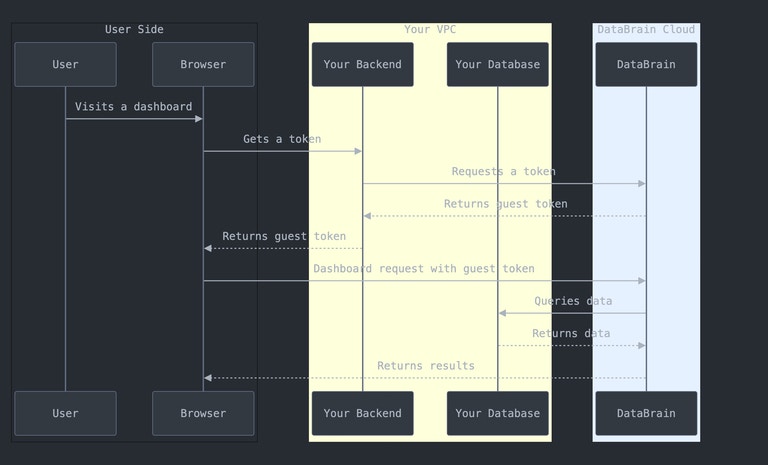 When using DataBrain Cloud, the platform hosts the analytics engine while securely connecting to your database:
Your user authenticates with your application
Your backend requests a guest token from DataBrain API with user context
Your frontend receives the token and embeds the DataBrain component
DataBrain queries your database directly and streams results to the embedded component
**Data Security:** Your data never passes through DataBrain's storage. Queries execute directly against your database, and results stream to the end user.
### Self-Hosted Deployment
When using DataBrain Cloud, the platform hosts the analytics engine while securely connecting to your database:
Your user authenticates with your application
Your backend requests a guest token from DataBrain API with user context
Your frontend receives the token and embeds the DataBrain component
DataBrain queries your database directly and streams results to the embedded component
**Data Security:** Your data never passes through DataBrain's storage. Queries execute directly against your database, and results stream to the end user.
### Self-Hosted Deployment
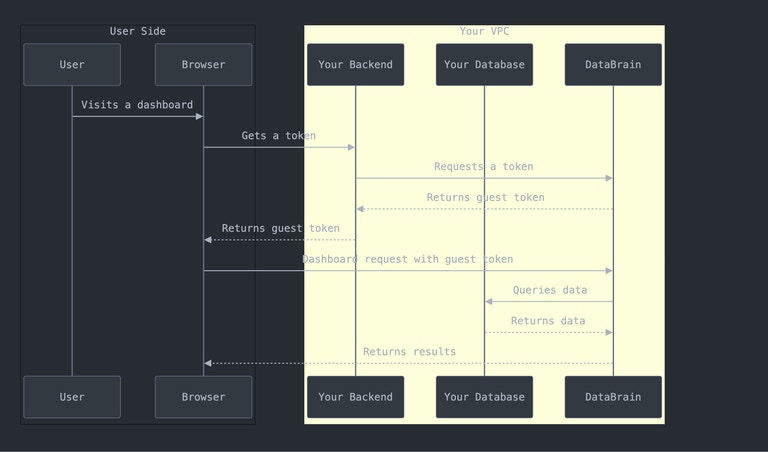 With self-hosted deployment, you run the entire DataBrain platform in your own infrastructure:
* **Complete control** over data and infrastructure
* **Network isolation** - everything stays within your VPC
* **Custom deployment** options (single server, HA, multi-region)
* **Air-gapped** support for isolated environments
***
## Key Architecture Concepts
### Stateless Guest Tokens
DataBrain uses stateless tokens instead of traditional user authentication:
**Benefits:**
* ✅ No user data storage - complete privacy
* ✅ No SSO setup required - integrate in minutes
* ✅ Multi-tenant isolation built-in
* ✅ Automatic expiration for security
* ✅ Opaque server-side tokens — nothing to forge or decode client-side
**How it works:**
```javascript theme={"dark"}
// Your backend generates a token
const token = await fetch('https://api.usedatabrain.com/api/v2/guest-token/create', {
method: 'POST',
headers: { 'Authorization': 'Bearer YOUR_API_KEY' },
body: JSON.stringify({
clientId: 'customer-123',
dataAppName: 'analytics-app'
})
});
// Your frontend embeds with the token
```
### Multi-Tenant Data Isolation
DataBrain supports N-level tenancy hierarchy (industry-unique):
Route different customers to completely different database servers. Perfect for dedicated database per enterprise customer.
Switch databases based on tenant within the same database server.
Isolate tenants in separate schemas within the same database.
Apply row-level security filters to ensure users only see their data.
```sql theme={"dark"}
-- Example RLS rule
SELECT * FROM orders WHERE customer_id = '{clientId}'
```
### Real-Time Query Execution
1. User interacts with embedded dashboard
2. Component sends authenticated request
3. DataBrain validates token and permissions
4. Generates optimized SQL with RLS applied
5. Executes directly against your database
6. Streams results back to user
**No data copying** - queries run in real-time against your live database.
**Built-in optimizations:**
* Query caching for frequently accessed data
* Connection pooling to your database
* Automatic query optimization
* Result streaming for large datasets
* CDN delivery for frontend assets
**Security at every layer:**
* Encrypted database connections (SSL/TLS)
* Row-level security enforcement
* Token expiration and validation
* Domain whitelisting
* Audit logging
***
## Deployment Options
### Cloud vs Self-Hosted
Choose the deployment that fits your needs:
**Best for:**
* Fast time-to-market
* Minimal DevOps resources
* Automatic updates
* Built-in scalability
**How it works:**
* DataBrain hosts the platform
* Connects securely to your database
* 99.9% uptime SLA
* Auto-scaling included
**Security:**
* VPC peering available (AWS)
* IP whitelisting
* SOC 2, ISO 27001, GDPR compliant
* Encrypted connections (TLS 1.2+)
**Best for:**
* Strict data sovereignty requirements
* Air-gapped environments
* Complete infrastructure control
* Custom compliance needs
**How it works:**
* Deploy in your infrastructure
* Full network isolation
* Custom deployment patterns
* Your security controls
**Infrastructure:**
* Docker, Kubernetes, or VMs
* PostgreSQL + Redis required
* Scales horizontally
* High-availability options
***
## Security & Compliance
### Data Protection
**At Rest:** AES-256 encryption for credentials
**In Transit:** TLS 1.2+ for all connections
**Passwords:** One-way hashing, never stored
**Token-based:** Stateless guest tokens
**Row-Level:** Automatic RLS enforcement
**Permissions:** Fine-grained access control
**VPC Peering:** Private connections (AWS)
**IP Whitelist:** Restrict access by IP
**Domain Whitelist:** Control embedding domains
**SOC 2 Type II:** Security audits
**ISO 27001:** Information security
**GDPR & HIPAA:** Data protection
### Best Practices
* Store API keys in environment variables
* Never expose keys in frontend code
* Rotate keys periodically
* Use separate keys per environment
* Set reasonable expiration times (1-24 hours)
* Refresh tokens before expiration
* Shorter expiry = better security
* Include RLS rules in token generation
* Whitelist only necessary domains
* Remove development domains in production
* Always use HTTPS in production
* Review whitelist regularly
***
## When to Use What
**Choose when:**
* You want fast deployment
* You have limited DevOps resources
* You need automatic scaling
* You want managed infrastructure
**Examples:**
* SaaS startups
* Small to medium businesses
* Teams without dedicated DevOps
**Choose when:**
* You have strict data residency requirements
* You need complete infrastructure control
* You operate in air-gapped environments
* You have specific compliance needs
**Examples:**
* Financial institutions
* Healthcare organizations
* Government agencies
* Large enterprises
***
## Next Steps
Get your first dashboard embedded in 5 minutes
Complete production deployment guide
Detailed technical architecture and implementation
Comprehensive security documentation
***
## Common Questions
No. DataBrain only stores metadata like dashboard configurations and metric definitions. Your actual data stays in your database. Queries execute in real-time against your database.
DataBrain supports 4-level tenancy: datasource, database, schema, and row-level. You can route users to different databases or apply row-level security filters - whatever matches your architecture.
**Cloud:** 99.9% uptime SLA with automatic failover and redundancy.
**Self-hosted:** Availability depends on your infrastructure. You can deploy with high-availability configurations.
Yes! DataBrain supports multi-datasource workspaces. You can route different customers to different databases, even across different database types.
Tokens are opaque UUIDs issued and stored server-side — there is nothing to decode or forge client-side, and there is no signing key to manage. They're validated against the server on every request, can be configured to expire, and include origin checking to prevent unauthorized use.
With self-hosted deployment, you run the entire DataBrain platform in your own infrastructure:
* **Complete control** over data and infrastructure
* **Network isolation** - everything stays within your VPC
* **Custom deployment** options (single server, HA, multi-region)
* **Air-gapped** support for isolated environments
***
## Key Architecture Concepts
### Stateless Guest Tokens
DataBrain uses stateless tokens instead of traditional user authentication:
**Benefits:**
* ✅ No user data storage - complete privacy
* ✅ No SSO setup required - integrate in minutes
* ✅ Multi-tenant isolation built-in
* ✅ Automatic expiration for security
* ✅ Opaque server-side tokens — nothing to forge or decode client-side
**How it works:**
```javascript theme={"dark"}
// Your backend generates a token
const token = await fetch('https://api.usedatabrain.com/api/v2/guest-token/create', {
method: 'POST',
headers: { 'Authorization': 'Bearer YOUR_API_KEY' },
body: JSON.stringify({
clientId: 'customer-123',
dataAppName: 'analytics-app'
})
});
// Your frontend embeds with the token
```
### Multi-Tenant Data Isolation
DataBrain supports N-level tenancy hierarchy (industry-unique):
Route different customers to completely different database servers. Perfect for dedicated database per enterprise customer.
Switch databases based on tenant within the same database server.
Isolate tenants in separate schemas within the same database.
Apply row-level security filters to ensure users only see their data.
```sql theme={"dark"}
-- Example RLS rule
SELECT * FROM orders WHERE customer_id = '{clientId}'
```
### Real-Time Query Execution
1. User interacts with embedded dashboard
2. Component sends authenticated request
3. DataBrain validates token and permissions
4. Generates optimized SQL with RLS applied
5. Executes directly against your database
6. Streams results back to user
**No data copying** - queries run in real-time against your live database.
**Built-in optimizations:**
* Query caching for frequently accessed data
* Connection pooling to your database
* Automatic query optimization
* Result streaming for large datasets
* CDN delivery for frontend assets
**Security at every layer:**
* Encrypted database connections (SSL/TLS)
* Row-level security enforcement
* Token expiration and validation
* Domain whitelisting
* Audit logging
***
## Deployment Options
### Cloud vs Self-Hosted
Choose the deployment that fits your needs:
**Best for:**
* Fast time-to-market
* Minimal DevOps resources
* Automatic updates
* Built-in scalability
**How it works:**
* DataBrain hosts the platform
* Connects securely to your database
* 99.9% uptime SLA
* Auto-scaling included
**Security:**
* VPC peering available (AWS)
* IP whitelisting
* SOC 2, ISO 27001, GDPR compliant
* Encrypted connections (TLS 1.2+)
**Best for:**
* Strict data sovereignty requirements
* Air-gapped environments
* Complete infrastructure control
* Custom compliance needs
**How it works:**
* Deploy in your infrastructure
* Full network isolation
* Custom deployment patterns
* Your security controls
**Infrastructure:**
* Docker, Kubernetes, or VMs
* PostgreSQL + Redis required
* Scales horizontally
* High-availability options
***
## Security & Compliance
### Data Protection
**At Rest:** AES-256 encryption for credentials
**In Transit:** TLS 1.2+ for all connections
**Passwords:** One-way hashing, never stored
**Token-based:** Stateless guest tokens
**Row-Level:** Automatic RLS enforcement
**Permissions:** Fine-grained access control
**VPC Peering:** Private connections (AWS)
**IP Whitelist:** Restrict access by IP
**Domain Whitelist:** Control embedding domains
**SOC 2 Type II:** Security audits
**ISO 27001:** Information security
**GDPR & HIPAA:** Data protection
### Best Practices
* Store API keys in environment variables
* Never expose keys in frontend code
* Rotate keys periodically
* Use separate keys per environment
* Set reasonable expiration times (1-24 hours)
* Refresh tokens before expiration
* Shorter expiry = better security
* Include RLS rules in token generation
* Whitelist only necessary domains
* Remove development domains in production
* Always use HTTPS in production
* Review whitelist regularly
***
## When to Use What
**Choose when:**
* You want fast deployment
* You have limited DevOps resources
* You need automatic scaling
* You want managed infrastructure
**Examples:**
* SaaS startups
* Small to medium businesses
* Teams without dedicated DevOps
**Choose when:**
* You have strict data residency requirements
* You need complete infrastructure control
* You operate in air-gapped environments
* You have specific compliance needs
**Examples:**
* Financial institutions
* Healthcare organizations
* Government agencies
* Large enterprises
***
## Next Steps
Get your first dashboard embedded in 5 minutes
Complete production deployment guide
Detailed technical architecture and implementation
Comprehensive security documentation
***
## Common Questions
No. DataBrain only stores metadata like dashboard configurations and metric definitions. Your actual data stays in your database. Queries execute in real-time against your database.
DataBrain supports 4-level tenancy: datasource, database, schema, and row-level. You can route users to different databases or apply row-level security filters - whatever matches your architecture.
**Cloud:** 99.9% uptime SLA with automatic failover and redundancy.
**Self-hosted:** Availability depends on your infrastructure. You can deploy with high-availability configurations.
Yes! DataBrain supports multi-datasource workspaces. You can route different customers to different databases, even across different database types.
Tokens are opaque UUIDs issued and stored server-side — there is nothing to decode or forge client-side, and there is no signing key to manage. They're validated against the server on every request, can be configured to expire, and include origin checking to prevent unauthorized use.