> ## Documentation Index
> Fetch the complete documentation index at: https://docs.usedatabrain.com/llms.txt
> Use this file to discover all available pages before exploring further.
# Dashboard Filter - Variable Apply On
> In this page you can see the functioning of variable apply on method available in Dashboard Filters.
Using Variable Filter in Dashboard Filter with Custom SQL
### Creating a Dashboard Filter with Variable Filter:
1. Create Dashboard Filter
2. In the “Apply On” section, choose **"Variable Filter"**
3. Assign Variable Name:
* Assign a variable name, for example, `{{global_value}}` for Dashboard Filter.
* Copy the variable `{{global_value}}` for use in your custom SQL query.
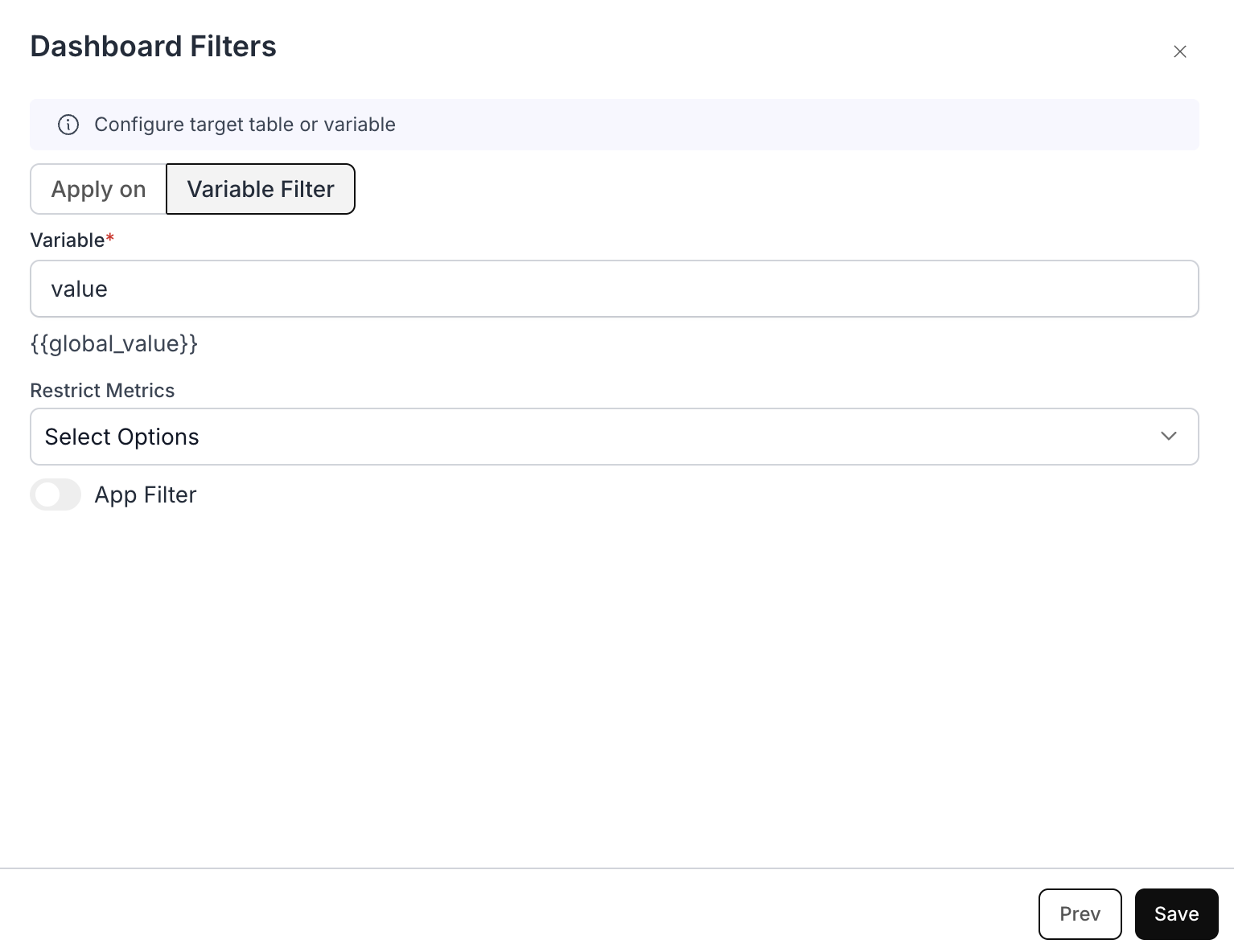 ### Example Use Case: Dynamic Country Population Analysis
Let's say you're building a dashboard where analysts need to quickly filter population data for different countries without modifying the underlying SQL query each time. Here's how the Dashboard Filter would be valuable:
**Purpose:**
* Allows users to dynamically select different countries to view their population data
* Eliminates the need to write separate queries for each country
* Provides a user-friendly interface for non-technical users
**Example Custom SQL Query with Variable Filter:**
* **Custom SQL you write:**
### Example Use Case: Dynamic Country Population Analysis
Let's say you're building a dashboard where analysts need to quickly filter population data for different countries without modifying the underlying SQL query each time. Here's how the Dashboard Filter would be valuable:
**Purpose:**
* Allows users to dynamically select different countries to view their population data
* Eliminates the need to write separate queries for each country
* Provides a user-friendly interface for non-technical users
**Example Custom SQL Query with Variable Filter:**
* **Custom SQL you write:**
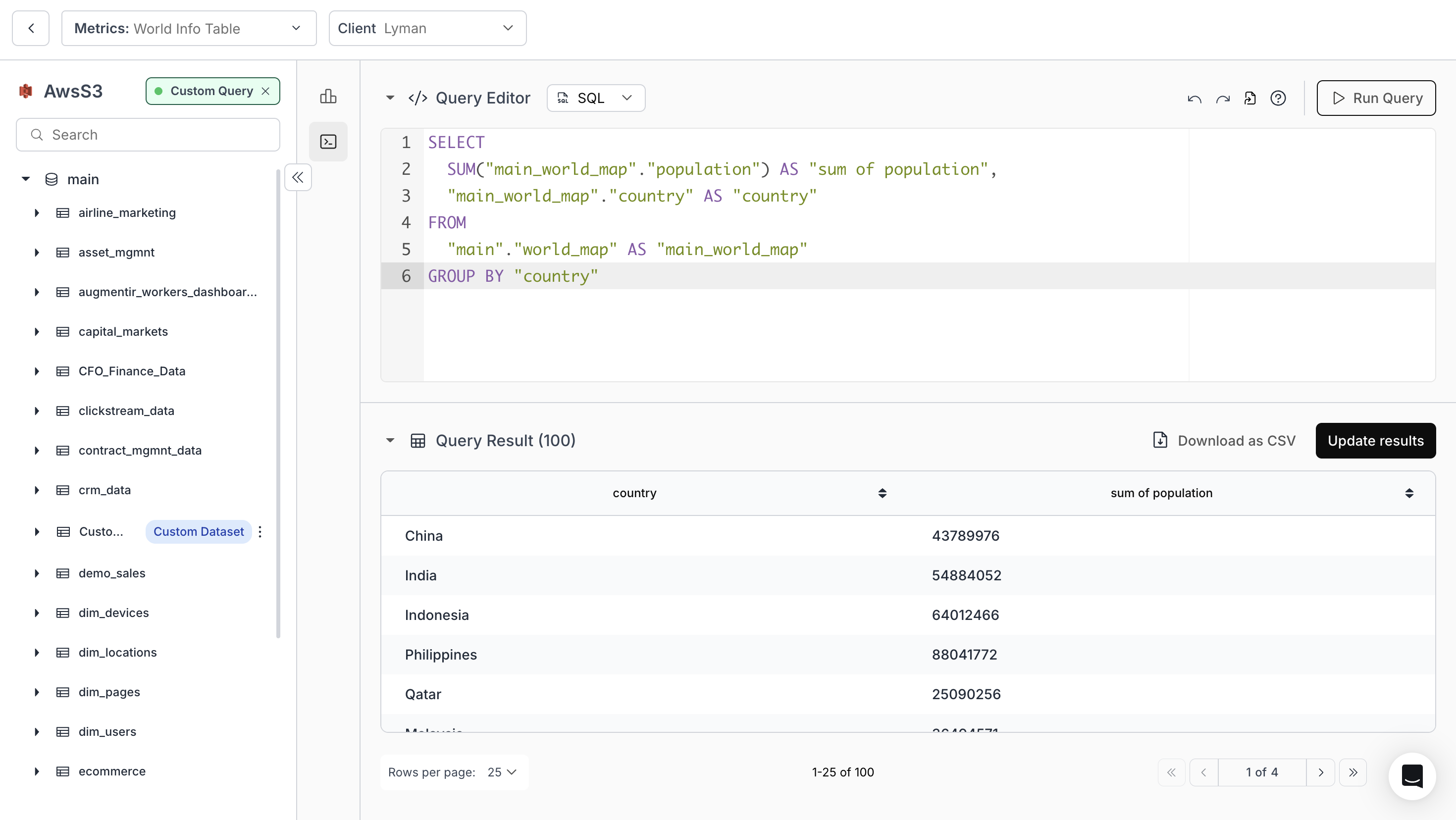 * **Custom SQL added with Variable Filter:**
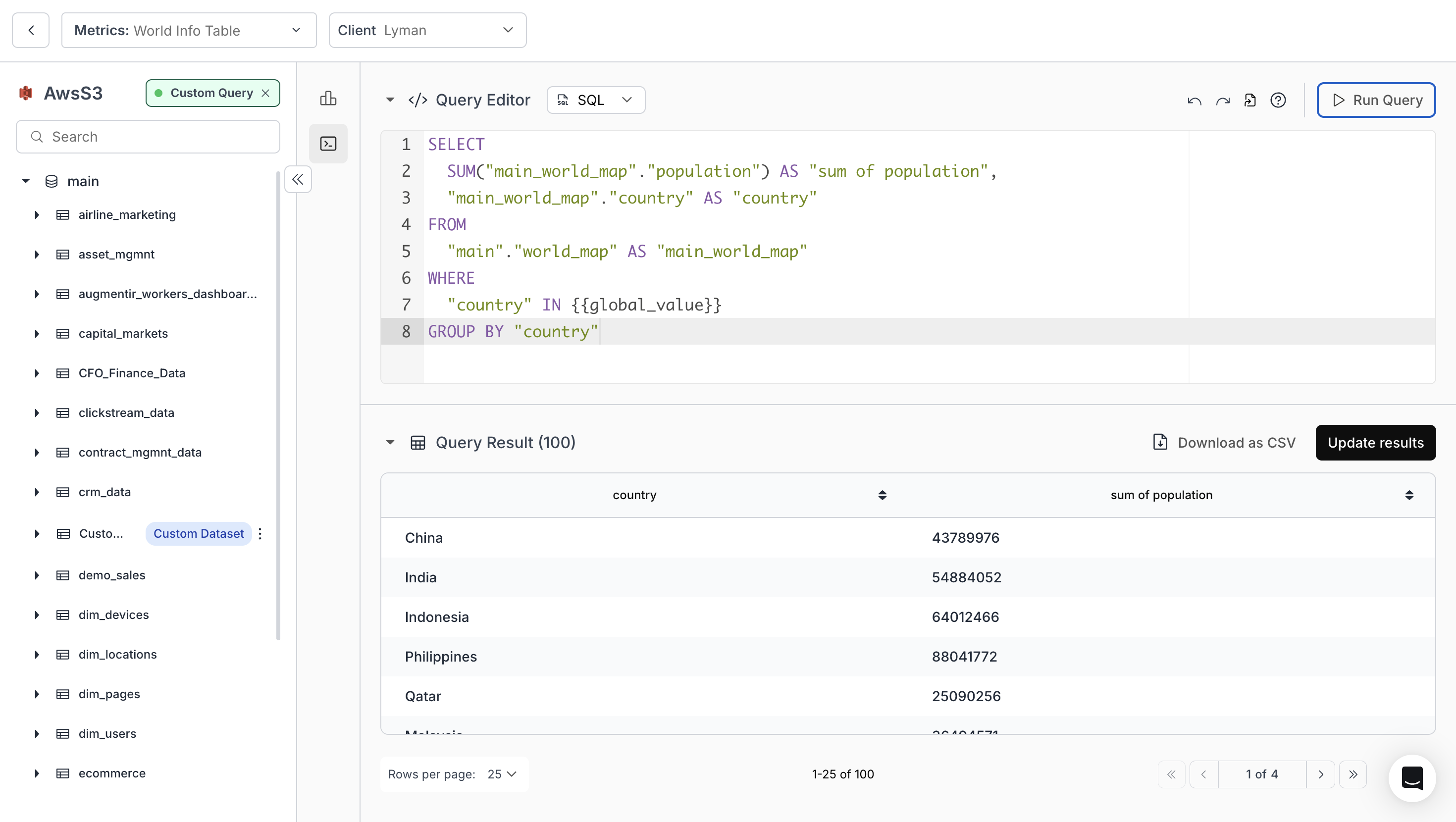 Then the Generated SQL we generate would look like this:
* **Resulting SQL:**
Then the Generated SQL we generate would look like this:
* **Resulting SQL:**
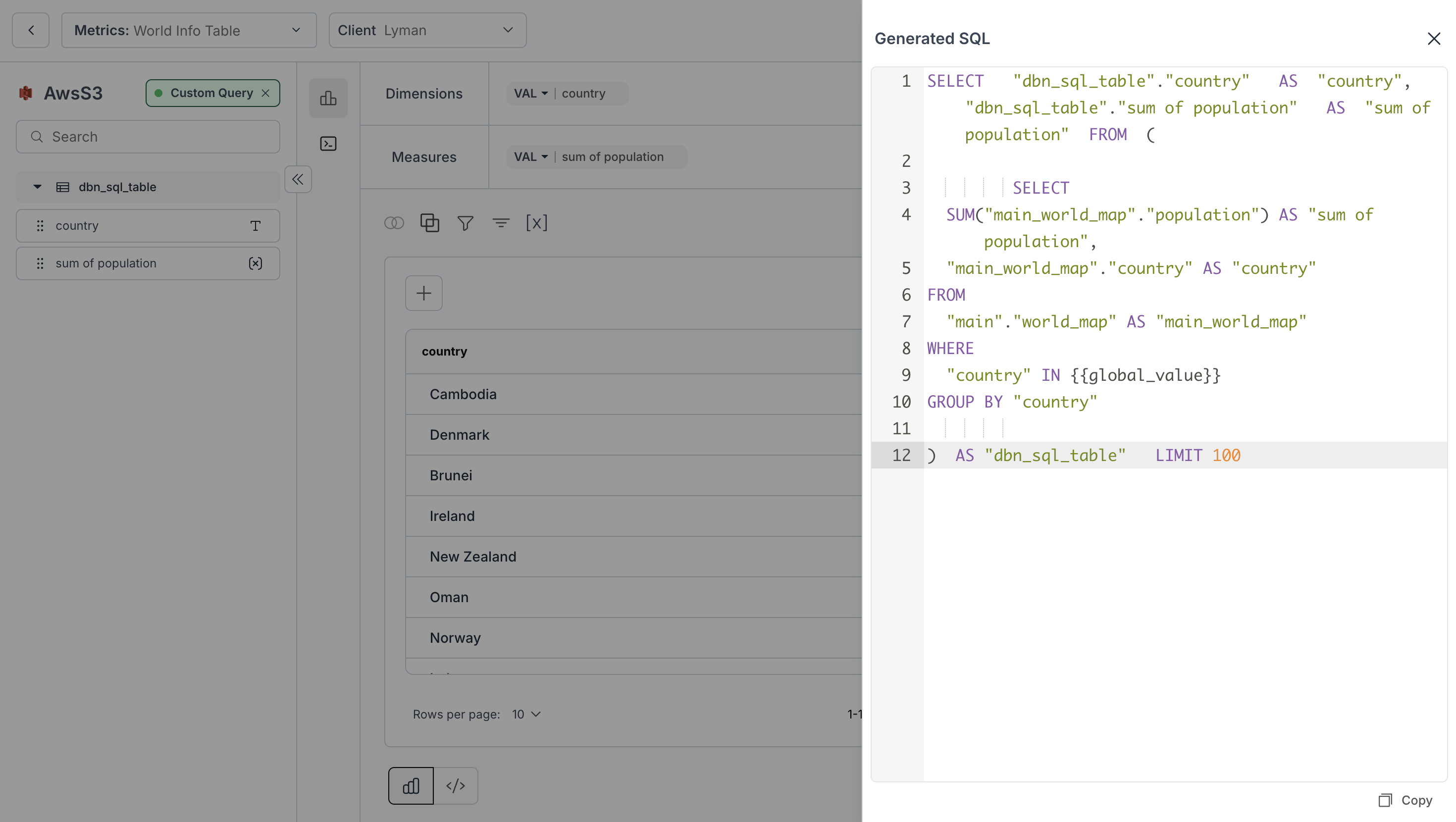 ### Working:
* Initial SQL query gets all country population data
* Variable Filter adds a WHERE clause with `{{global_value}}`
* When users select a country from the filter, it automatically updates the query
* Results are instantly filtered to show only the selected country's data
### Important: Where and how to use the variable
* **Keep the variable in the WHERE clause** of your metric's SQL. The variable name must exactly match the filter's variable name (case-sensitive), and the filter needs a value or default — if the query runs while a `{{variable}}` is still unresolved, you get: **Error: Filter or Client variables detected in the query.** There is no built-in way to display or "inspect" the current filter value in a metric, so a variable in SELECT has no supported use.
* **Single-select filter:** The variable is replaced by a single quoted value; use `WHERE column = {{var}}`.
* **Multi-select filter:** The variable is replaced by a parenthesized list of quoted values, e.g. `( 'US' , 'CA' )`; use `WHERE column IN {{var}}` — **without** your own parentheses (`IN ({{var}})` double-wraps into invalid SQL), and do not use `= {{var}}` for multi-select.
### Dashboard Result After Applying Filter with Variable Value
The metrics are filtered according to the values selected in the dashboard filter
### Working:
* Initial SQL query gets all country population data
* Variable Filter adds a WHERE clause with `{{global_value}}`
* When users select a country from the filter, it automatically updates the query
* Results are instantly filtered to show only the selected country's data
### Important: Where and how to use the variable
* **Keep the variable in the WHERE clause** of your metric's SQL. The variable name must exactly match the filter's variable name (case-sensitive), and the filter needs a value or default — if the query runs while a `{{variable}}` is still unresolved, you get: **Error: Filter or Client variables detected in the query.** There is no built-in way to display or "inspect" the current filter value in a metric, so a variable in SELECT has no supported use.
* **Single-select filter:** The variable is replaced by a single quoted value; use `WHERE column = {{var}}`.
* **Multi-select filter:** The variable is replaced by a parenthesized list of quoted values, e.g. `( 'US' , 'CA' )`; use `WHERE column IN {{var}}` — **without** your own parentheses (`IN ({{var}})` double-wraps into invalid SQL), and do not use `= {{var}}` for multi-select.
### Dashboard Result After Applying Filter with Variable Value
The metrics are filtered according to the values selected in the dashboard filter
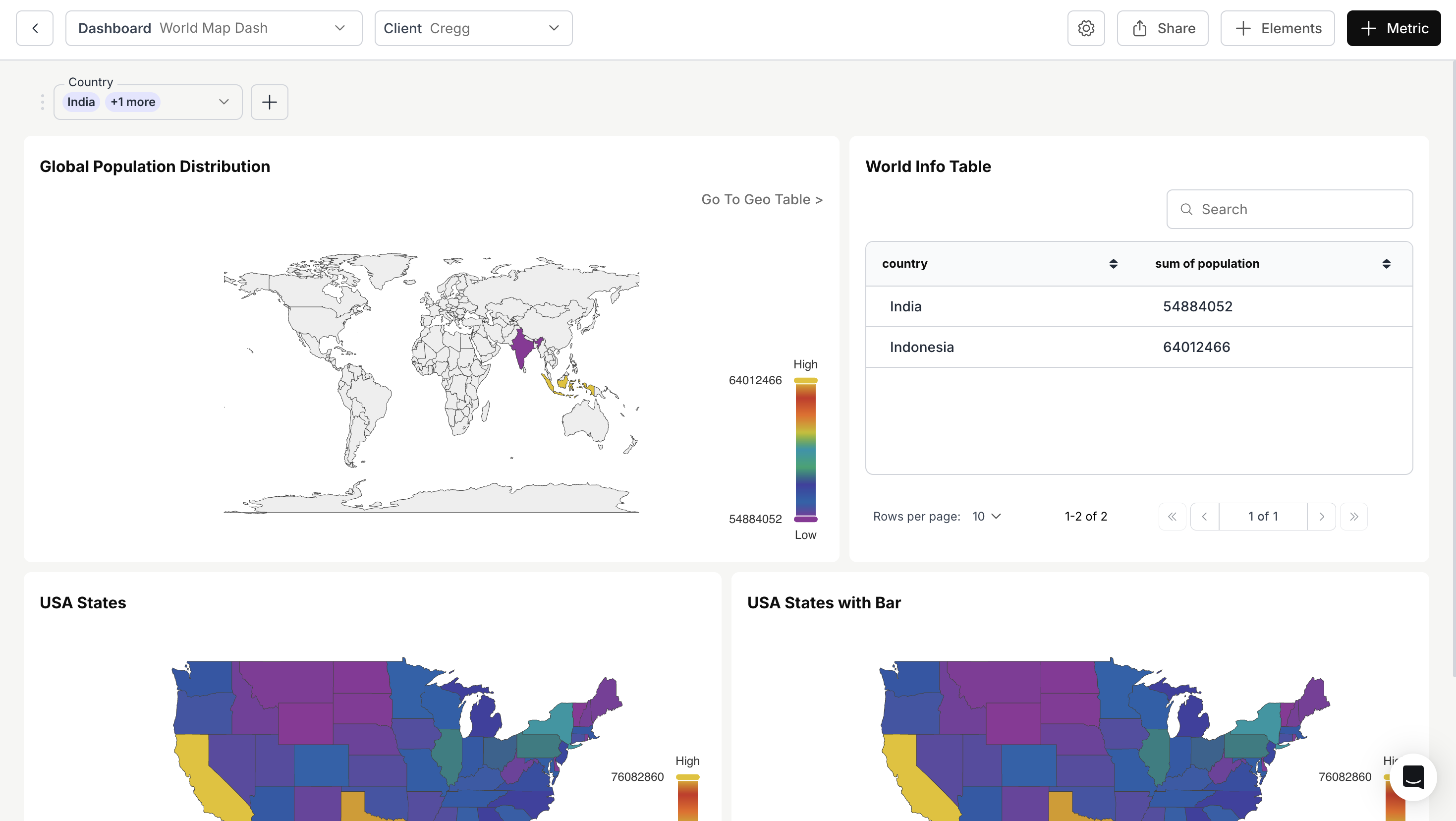 Variable Apply-On Filter configured successfully. The filter now passes the selected value into your SQL query dynamically.