> ## Documentation Index
> Fetch the complete documentation index at: https://docs.usedatabrain.com/llms.txt
> Use this file to discover all available pages before exploring further.
# Custom SQL Query Guidelines
> This guide provides best practices for writing well-structured SQL queries to improve readability, maintainability, and performance.
### Formatting Instructions
1. Use consistent indentation (2 or 4 spaces) for nested clauses.
2. Place each major SQL clause (`SELECT`, `FROM`, `WHERE`, `GROUP BY`, `HAVING`, `ORDER BY`) on a new line.
3. Write SQL keywords in uppercase for clarity.
4. Align columns, conditions, and `JOIN` clauses vertically when appropriate.
5. Use aliases for all column names, table names, subqueries, and join tables with the `AS` keyword.
6. Choose descriptive and meaningful aliases that accurately represent the data.
7. List each column on a separate line in the `SELECT` clause when selecting multiple columns.
8. Ensure proper spacing around operators and commas.
9. Use table aliases for all table references to improve query readability.
10. For database tenancy, replace all schema references with `{{DATABASE_NAME}}`.
To apply these guidelines to different SQL environments, refer to the sections below:
**Guideline 1: Use Aliases for Readability**
Always use **aliases** for column names, table names, subqueries, and join tables using the `AS` keyword. Aliases improve readability and make queries more concise.
**Guideline 2: Enclose Identifiers in Double Quotes (**`"`**)**
Always use **double quotes** for column, table, and subquery names to avoid conflicts with reserved keywords and case-sensitive identifiers.
**Guideline 3: Reference Tables with the Database Name**
Always **prefix tables** with the database and schema name to ensure clarity, especially in multi-schema databases.
\*\*Example Use \*\*
**Case**
```
SELECT
SUM("listing_data"."totalprice") AS "sum_of_totalprice", -- ✔ Column Alias with Double Quotes
"public_category"."catname" AS "catname", -- ✔ Column Alias with Double Quotes
"public_event"."eventname" AS "eventname" -- ✔ Column Alias with Double Quotes
FROM
"{{DATABASE_NAME}}"."category" AS "public_category" -- ✔ Table Alias with Double Quotes and Database Reference
INNER JOIN "{{DATABASE_NAME}}"."event" AS "public_event" -- ✔ Join Table Alias with Double Quotes and Database Reference
ON "public_category"."catid" = "public_event"."catid"
INNER JOIN (
SELECT
"listing"."eventid" AS "eventid", -- ✔ Column Alias with Double Quotes
"listing"."totalprice" AS "totalprice" -- ✔ Column Alias with Double Quotes
FROM
"{{DATABASE_NAME}}"."listing" AS "listing" -- ✔ Table Alias with Double Quotes and Database Reference
) AS "listing_data"
ON "public_event"."eventid" = "listing_data"."eventid"
GROUP BY
"public_category"."catname",
"public_event"."eventname"
```
**Guideline 1: Use Aliases for Readability**
Always use **aliases** for column names, table names, subqueries, and join tables using the `AS` keyword. Aliases improve readability and make queries more concise.
**Guideline 2: Enclose Identifiers in Double Quotes (**`"`**)**
Always use **double quotes** for column names to avoid conflicts with reserved keywords and case-sensitive identifiers.
**Guideline 3: Reference Tables with the Database Name**
Always **prefix tables** with the database and schema name to ensure clarity, especially in multi-schema databases.
**Example Use Case**
```
SELECT
SUM("databrain_dev2_demo_sales"."quantity sold") AS "sum of quantity sold", -- ✔ Column Alias with Double Quotes
"databrain_dev2_demo_sales"."client name" AS "client name" -- ✔ Column Alias with Double Quotes
FROM
"databrain_dev2"."demo_sales" AS databrain_dev2_demo_sales -- ✔ Table Alias (No Quotes)
INNER JOIN (
SELECT
"customer id",
"sales representative id"
FROM "databrain_dev2"."customer_data"
) AS databrain_dev2_customer_data -- ✔ Subquery Alias (No Quotes)
ON "databrain_dev2_demo_sales"."client name" = "databrain_dev2_customer_data"."customer id"
GROUP BY
"databrain_dev2_demo_sales"."client name"
```
**Guideline 1: Use Aliases for Readability**
Always use **aliases** for column names, table names, subqueries, and join tables using the `AS` keyword. Aliases improve readability and make queries more concise.
**Guideline 2: Enclose Identifiers in Double Quotes (**`` ` ``**)**
Always use **backticks** for column names to avoid conflicts with reserved keywords and case-sensitive identifiers.
**Guideline 3: Reference Tables with the Database Name**
Always **prefix tables** with the database and schema name to ensure clarity, especially in multi-schema databases.
```
SELECT
SUM(`databrain_dev2_demo_sales`.`quantity sold`) AS `sum of quantity sold`, -- Column Alias with Backtiks
`databrain_dev2_demo_sales`.`client name` AS `client name` -- Column Alias with Backtiks
FROM
`databrain_dev2`.`demo_sales` AS databrain_dev2_demo_sales -- Table Alias (NO BACKTICKS)
INNER JOIN (
SELECT
`customer id`,
`sales representative id`
FROM `databrain_dev2`.`customer_data`
) AS databrain_dev2_customer_data -- Subquery Alias (NO BACKTICKS)
ON `databrain_dev2_demo_sales`.`client name` = `databrain_dev2_customer_data`.`customer id`
GROUP BY
`databrain_dev2_demo_sales`.`client name`
```
\*\*Guideline 1: \*\*Use clear and consistent formatting
\*\*Guideline 2: \*\*Write precise queries
\*\*Guideline 3: \*\*Utilize column aliases
**Example Use Case**
```
SELECT
c.customer_id,
CONCAT(c.last_name, ', ', c.first_name) AS customer_name, -- ✔ Using column alias
a.phone,
f.title AS rented_film -- ✔ Using column alias
FROM
rental r
INNER JOIN customer c ON r.customer_id = c.customer_id -- ✔ Clear formatting with JOIN on new line
INNER JOIN address a ON c.address_id = a.address_id -- ✔ Consistent indentation
INNER JOIN inventory i ON r.inventory_id = i.inventory_id
INNER JOIN film f ON i.film_id = f.film_id
WHERE
r.return_date IS NULL -- ✔ Precise filtering
AND r.rental_date + INTERVAL f.rental_duration DAY < CURRENT_DATE() -- ✔ Specific condition
ORDER BY
c.last_name, c.first_name -- ✔ Major clause on new line
LIMIT 5; -- ✔ Precise result set size
```
**Guideline 1: Use Aliases for Readability**
Always use **aliases** for column names, table names, subqueries, and join tables using the `AS` keyword. Aliases improve readability and make queries more concise.
**Guideline 2: Enclose Identifiers in Double Quotes (**`"`**)**
Always use **double quotes** for column, table, and subquery names to avoid conflicts with reserved keywords and case-sensitive identifiers.
**Guideline 3: Reference Tables with the Database Name**
Always **prefix tables** with the database and schema name to ensure clarity, especially in multi-schema databases.
**Example Use Case**
```
SELECT
COUNT("public_posts"."user_id") AS "count of user_id", -- Column Alias with Double Quotes
"public_users"."username" AS "username"
FROM
"public"."users" AS "public_users" -- Table Alias with Double Quotes & Database Reference
INNER JOIN (
SELECT
"user_id",
"id" AS "post_id"
FROM "public"."posts"
) AS "public_posts" -- Subquery Alias with Double Quotes
ON "public_users"."id" = "public_posts"."user_id"
GROUP BY
"public_users"."username"
```
**Guideline 1: Use proper syntax for MongoDB collections and fields**
When querying MongoDB with SQL, wrap collection names and field names in square brackets to avoid syntax errors.
**Guideline 2: Utilize projections to return only necessary dat**a
This improves query performance by limiting the amount of data transferred and processed.
**Guideline 3: Leverage indexing for frequently queried fields**
Create indexes on commonly searched fields to significantly enhance query performance
```
SELECT [first_name], [last_name], [address.city], [transactions]
FROM [Customers]
WHERE [author_name] = 'John Doe'
ORDER BY [timestamp] DESC
LIMIT 10
```
**Guideline 1: Use Aliases for column names**
**Guideline 2: Do not use schema names**
```
SELECT
"first_name" AS "fname",
"last_name" AS "lname",
"city" AS "City"
FROM "customers"
WHERE "created_at" BETWEEN '2025-01-01' AND '2025-03-20'
AND "status" = 'active'
ORDER BY "first_name", "last_name" DESC
LIMIT 10
```
\*\*Guideline 1: \*\*Use specific column names instead of SELECT \*
This reduces the amount of data processed and transferred, speeding up queries.
\*\*Guideline 2: \*\*Utilize WHERE clauses to filter rows early
This reduces the number of rows processed in later stages of the query, improving performance.
**Guideline 3: Implement proper indexing**
Create indexes on frequently queried columns to drastically improve query performance.
```
SELECT o.order_id, c.customer_name, o.order_total
FROM orders o
JOIN customers c ON o.customer_id = c.customer_id
WHERE o.order_date >= '2025-01-01' AND o.order_date <= '2025-03-20'
AND c.region = 'North America'
ORDER BY o.order_date DESC
LIMIT 10
```
\*\*Guideline 1: Use Clear and Consistent Aliases for Columns and Tables \*\*
Use descriptive and consistent aliases (with `AS`) for column and table names to improve readability and simplify column references.
**Guideline 2: Enclose Identifiers in Backticks**
Use backticks around column and table names, especially if they contain spaces, special characters, or case sensitivity to avoid parsing errors.
```
SELECT
COUNT(`default_demo_sales`.`customer id`) AS `count of customer id`,
`default_demo_sales`.`store name` AS `store name`,
`default_demo_sales`.`product category` AS `product category`
FROM
`default`.`demo_sales` AS `default_demo_sales`
GROUP BY
`store name`,
`product category`
limit
100
```
**Guideline 1: Use Aliases for Readability**
Always use **aliases** for column names, table names, subqueries, and join tables using the `AS` keyword. Aliases improve readability and make queries more concise.
**Guideline 2: Enclose Identifiers in Double Quotes (**`"`**)**
Always use **double quotes** for column, table, and subquery names to avoid conflicts with reserved keywords and case-sensitive identifiers.
**Guideline 3: Reference Tables with the Database Name**
Always **prefix tables** with the database and schema name to ensure clarity, especially in multi-schema databases.
**Example Use Case**
```
SELECT
TOP 100 "dbn_sql_table"."name" AS "name",
"dbn_sql_table"."available" AS "available"
FROM
(
SELECT
TOP 100 "dbo_person"."name" AS "name", -- ✔ Column Alias with Double Quotes
"dbo_pizza_topping"."available" AS "available" -- ✔ Column Alias with Double Quotes
FROM
"dbo"."person" AS "dbo_person" -- ✔ Table Alias with Double Quotes & Database Reference
INNER JOIN (
SELECT
"id",
"available"
FROM
"dbo"."pizza_topping"
) AS "dbo_pizza_topping" -- Subquery Alias
ON "dbo_person"."person_id" = "dbo_pizza_topping"."id"
) AS "dbn_sql_table"
```
**Guideline 1: Use Aliases for Readability**
Always use **aliases** for column names, table names, subqueries, and join tables using the `AS` keyword. Aliases improve readability and make queries more concise.
**Guideline 2: Enclose Identifiers in Double Quotes (**`"`**)**
Always use **double quotes** for column, table, and subquery names to avoid conflicts with reserved keywords and case-sensitive identifiers.
**Guideline 3: Reference Tables with the Database Name**
Always **prefix tables** with the database and schema name to ensure clarity, especially in multi-schema databases.
**Example Use Case**
```
SELECT
"main_orders"."order_id" AS "Order ID", -- ✔ Column Alias & Double Quotes
"main_customers"."first_name" AS "First Name", -- ✔ Column Alias & Double Quotes
"main_customers"."last_name" AS "Last Name", -- ✔ Column Alias & Double Quotes
"main_coffees"."name" AS "Coffee Name", -- ✔ Column Alias & Double Quotes
"main_orders"."quantity" AS "Quantity" -- ✔ Column Alias & Double Quotes
FROM
"main"."orders" AS "main_orders" -- ✔ Table Alias, Database Reference & Double Quotes
JOIN "main"."customers" AS "main_customers" -- ✔ Join Table Alias, Database Reference & Double Quotes
ON "main_orders"."customer_id" = "main_customers"."customer_id"
JOIN "main"."coffees" AS "main_coffees" -- ✔ Join Table Alias, Database Reference & Double Quotes
ON "main_orders"."coffee_id" = "main_coffees"."coffee_id"
JOIN (
SELECT
"main_orders"."customer_id" AS "customer_id", -- ✔ Column Alias & Double Quotes
SUM("main_orders"."quantity" * "main_coffees"."price") AS "Amount Spent" -- ✔ Column Alias & Double Quotes
FROM
"main"."orders" AS "main_orders" -- ✔ Table Alias, Database Reference & Double Quotes
JOIN "main"."coffees" AS "main_coffees" -- ✔ Join Table Alias, Database Reference & Double Quotes
ON "main_orders"."coffee_id" = "main_coffees"."coffee_id"
GROUP BY
"main_orders"."customer_id"
) AS "sq" -- ✔ Subquery Alias & Double Quotes
ON "main_orders"."customer_id" = "sq"."customer_id"
```
**Guideline 1: Use Aliases for Readability**
Always use **aliases** for column names, table names, subqueries, and join tables using the `AS` keyword. Aliases improve readability and make queries more concise.
**Guideline 2: Enclose Identifiers in Double Quotes (**`"`**)**
Always use **double quotes** for column, table, and subquery names to avoid conflicts with reserved keywords and case-sensitive identifiers.
**Guideline 3: Reference Tables with the Database Name**
Always **prefix tables** with the database and schema name to ensure clarity, especially in multi-schema databases.
**Example Use Case**
```
SELECT
SUM("public_levels"."maxpoints") AS "sum of maxpoints", -- ✔ Column Alias with Double Quotes
"public_games"."title" AS "title", -- ✔ Column Alias with Double Quotes
COUNT("public_rankings"."playerid") AS "num_players" -- ✔ Column Alias with Double Quotes
FROM
"public"."games" AS "public_games" -- ✔ Table Alias with Double Quotes & Database Reference
INNER JOIN "public"."levels" AS "public_levels" -- ✔ Join Table Alias with Double Quotes & Database Reference
ON "public_games"."gameid" = "public_levels"."gameid"
INNER JOIN (
SELECT DISTINCT "gameid", "playerid"
FROM "public"."rankings"
WHERE "totalscore" > 0
) AS "public_rankings" -- Subquery with Alias
ON "public_games"."gameid" = "public_rankings"."gameid"
GROUP BY
"public_games"."title"
```
**Guideline 1: Use Aliases for Readability**
Always use **aliases** for column names, table names, subqueries, and join tables using the `AS` keyword. Aliases improve readability and make queries more concise.
**Guideline 2: Enclose Identifiers in Backticks (**`` ` ``**)**
Database names, table names, and column names should be enclosed in **backticks (\`).**
**Guideline 3: Reference Tables with the Database Name**
Always **prefix tables** with the database and schema name to ensure clarity, especially in multi-schema databases.
```
SELECT
SUM(`public_levels`.`maxpoints`) AS `sum_of_maxpoints`, -- ✔ Column Alias with Backticks
`public_games`.`title` AS `title`, -- ✔ Column Alias with Backticks
COUNT(`public_rankings`.`playerid`) AS `num_players` -- ✔ Column Alias with Backticks
FROM
`public`.`games` AS `public_games` -- ✔ Table Alias with Backticks & Database Reference
INNER JOIN `public`.`levels` AS `public_levels` -- ✔ Join Table Alias with Backticks & Database Reference
ON `public_games`.`gameid` = `public_levels`.`gameid`
INNER JOIN (
SELECT DISTINCT `gameid`, `playerid`
FROM `public`.`rankings`
WHERE `totalscore` > 0
) AS `public_rankings` -- Subquery with Alias
ON `public_games`.`gameid` = `public_rankings`.`gameid`
GROUP BY
`public_games`.`title`;
```
\*\*Guideline 1: Use Clear and Consistent Aliases for Columns and Tables \*\*
Use descriptive and consistent aliases (with `AS`) for column and table names to improve readability and simplify column references.
**Guideline 2: Enclose Identifiers in Backticks**
Use backticks around column and table names, especially if they contain spaces, special characters, or case sensitivity to avoid parsing errors.
```
SELECT
`store_state` AS `store_state`,
`store_city` AS `store_city`,
`store_name` AS `store_name`,
SUM(`product_stock_level`) AS `sum_of_product_stock_level`
FROM
`demo_sales_dot` AS `demo_sales_dot_demo_sales_dot`
GROUP BY
`store_state`,
`store_city`,
`store_name`
LIMIT
100
```
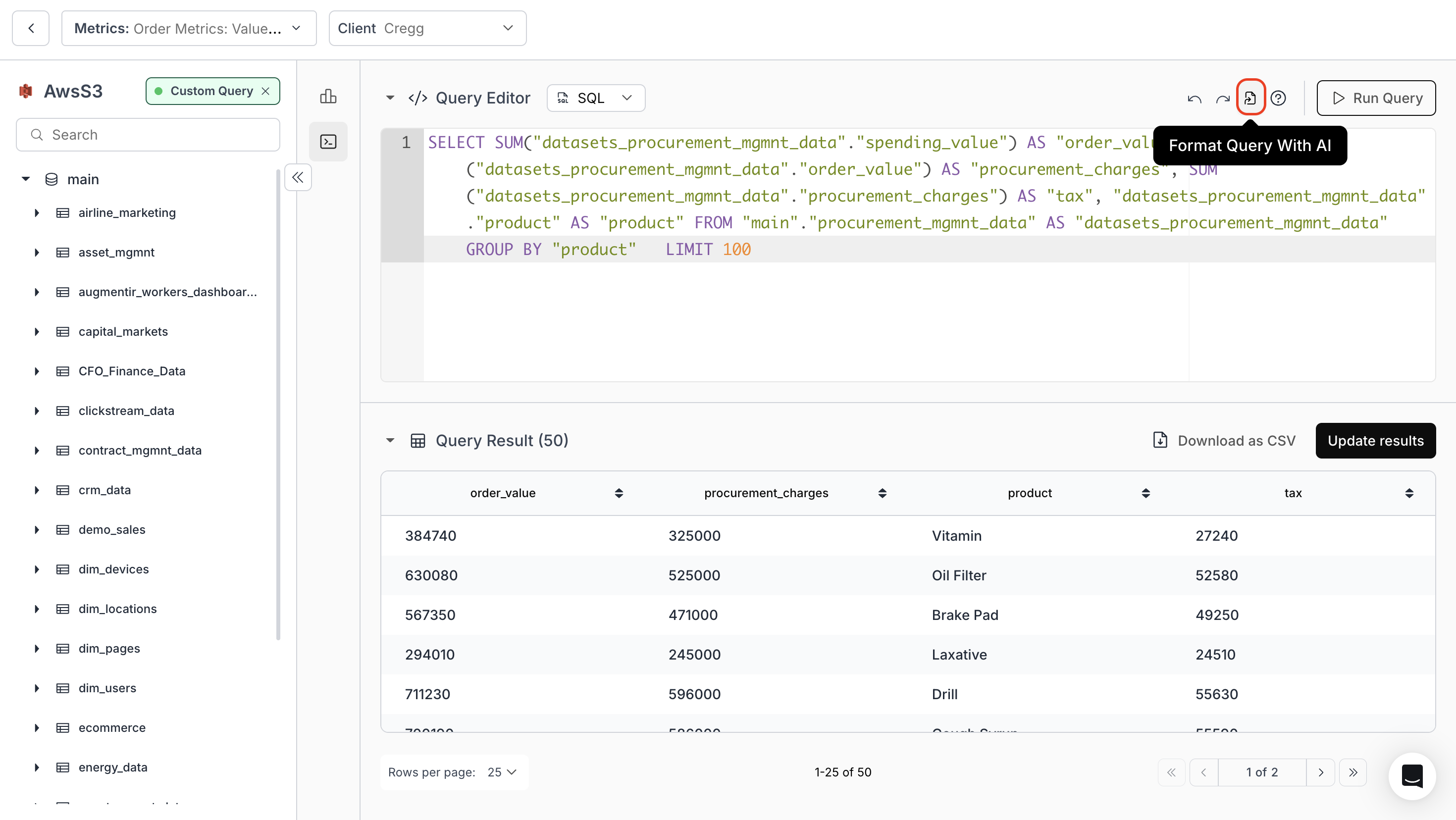
To automatically correct and format your SQL query, click the **“Format Query with AI”** icon. This converts your SQL into DataBrain’s preferred format, ensuring proper syntax, clear indentation, and better readability.