> ## Documentation Index
> Fetch the complete documentation index at: https://docs.usedatabrain.com/llms.txt
> Use this file to discover all available pages before exploring further.
# Python Editor Console
## Introduction
This document provides detailed guidelines on using the integrated Python editor console within our platform. The editor is pre-configured with essential libraries and functionalities to assist in executing Python scripts effectively, particularly for data querying and handling secrets.
## Where to find the Python Editor Console?
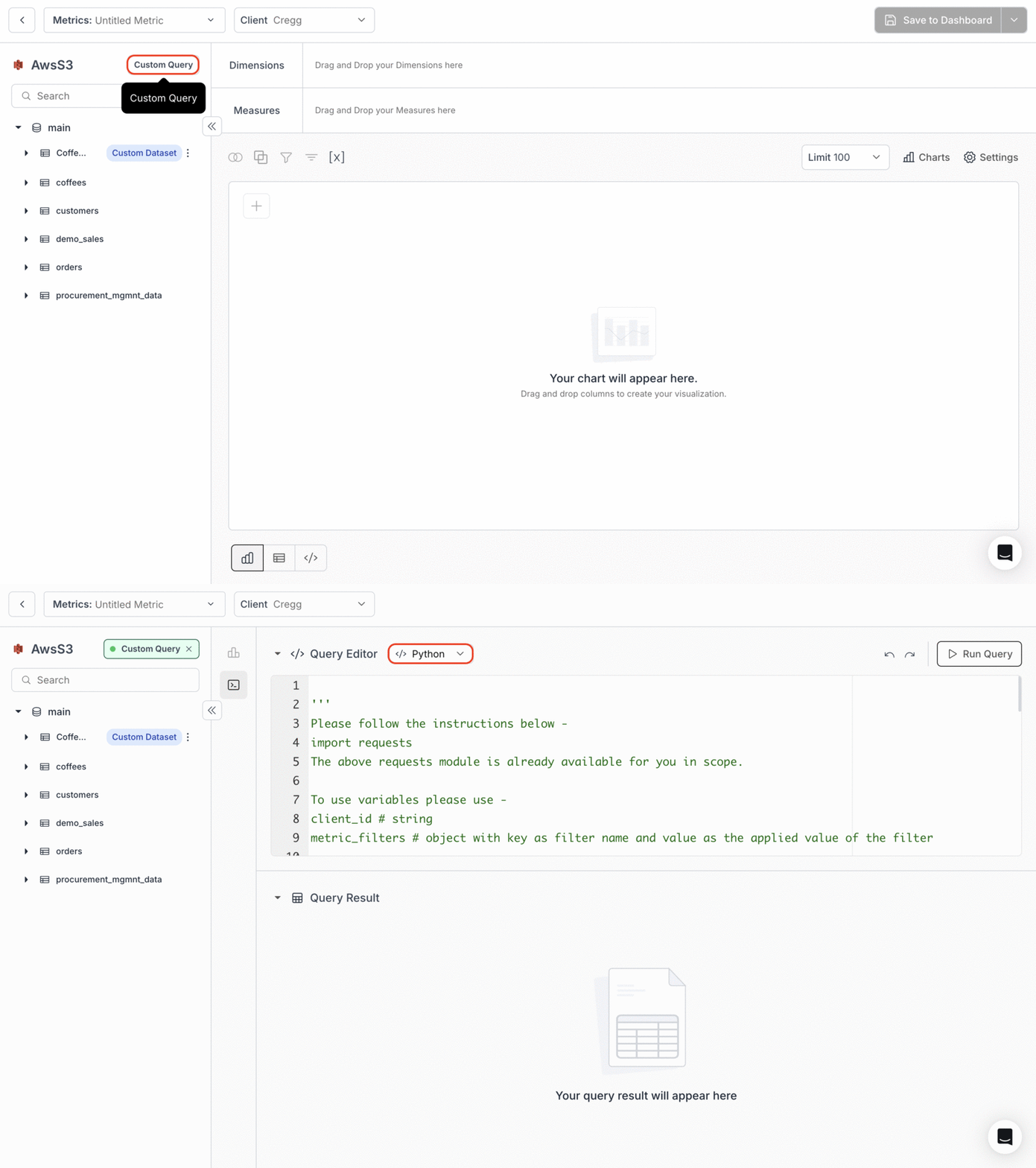
* In the **Create Metric** page, click on the **"Custom Query"** option located at the top left side of the page.
* Then, choose **` Python`** from the dropdown in the **` Query Editor`** panel to access our Python Editor Console.
 ## Pre-installed Libraries
* **Requests Module**: The `requests` library is readily available and pre-imported for HTTP requests.\
You do not need to import it again in your scripts.
```python theme={"dark"}
import requests # This module is already available in the scope
```
## Working with Variables
To integrate dynamic data within your scripts, you can utilize predefined variables and data structures:
* **Client ID**: Use the variable `client_id` which should be a string representing the client identifier.
* **Metric Filters**: This variable `metric_filters` allows for the filtering of data based on various criteria. The structure of `metric_filters` is defined as follows:
```python theme={"dark"}
from typing import Dict, Optional, Union
import datetime
class DateDict:
startDate: datetime.date
endDate: datetime.date
# MetricFilters type annotation
MetricFilters = Dict[str, Union[DateDict, str, int]]
```
The `metric_filters` variable can include filters of types `STRING`, `DATE`, and `NUMBER`, uniquely identified by a filter name:
* **STRING**: A plain string value.
* **DATE**: A dictionary containing `startDate`and `endDate`, both of `datetime.date` type.
* **NUMBER**: An integer value.
**When is metric\_filters populated?**\
`metric_filters` is populated only when (1) the metric's SQL query **actually uses** that filter variable (e.g. in a WHERE clause), and (2) the metric is run **in a dashboard context** where that filter is applied and the user has selected a value. If you see empty `{}` even when a filter is selected, check that the metric's SQL references the filter variable by the exact name, and that you are running from a dashboard view with the filter applied—not from a standalone console or a metric that does not use the filter.
### Handling Secrets
Secrets are stored and accessed via the `secrets` dictionary. This allows secure storage and retrieval of sensitive data such as API keys or database credentials. You can set up your secrets in the **Home Page → Settings Tab → Secrets**.
```python theme={"dark"}
url = secrets['BASE_URL'] # Accessing the base URL stored in secrets
res = requests.get(url).json() # Making a GET request using the retrieved URL
```
### Storing Results
To store or output data from your script, assign your data to the `result`variable. This variable should be an array of objects (or a list of dictionaries in Python terms):
```python theme={"dark"}
result = [{'key': 'value'}, ...] # An example assignment to the result variable
result = requests.get('SOME URL').json() # Storing JSON response from a GET request
```
### Usage Example
Here’s are some quick examples demonstrating how to utilize these capabilities:
```python theme={"dark"}
country_population = {
'USA': 331000000,
'India': 1380000000,
'China': 1430000000,
'Brazil': 212600000,
'Nigeria': 206000000
}
result = [{'country': country, 'population': population} for country, population in country_population.items()]
```
```python theme={"dark"}
# Assuming client_id and metric_filters are predefined
client_id = '12345'
metric_filters = {'salesDate': {'startDate': datetime.date(2021, 1, 1), 'endDate': datetime.date(2021, 12, 31)}}
# Accessing a secret
api_url = secrets['API_URL']
# Making a GET request
response = requests.get(f"{api_url}/data?client_id={client_id}").json()
# Assigning response to result
result = response
```
This guide should help you effectively utilize the Python editor console for your data handling needs. The capabilities outlined here are designed to enhance the security, flexibility, and efficiency of your data manipulation tasks.
## Pre-installed Libraries
* **Requests Module**: The `requests` library is readily available and pre-imported for HTTP requests.\
You do not need to import it again in your scripts.
```python theme={"dark"}
import requests # This module is already available in the scope
```
## Working with Variables
To integrate dynamic data within your scripts, you can utilize predefined variables and data structures:
* **Client ID**: Use the variable `client_id` which should be a string representing the client identifier.
* **Metric Filters**: This variable `metric_filters` allows for the filtering of data based on various criteria. The structure of `metric_filters` is defined as follows:
```python theme={"dark"}
from typing import Dict, Optional, Union
import datetime
class DateDict:
startDate: datetime.date
endDate: datetime.date
# MetricFilters type annotation
MetricFilters = Dict[str, Union[DateDict, str, int]]
```
The `metric_filters` variable can include filters of types `STRING`, `DATE`, and `NUMBER`, uniquely identified by a filter name:
* **STRING**: A plain string value.
* **DATE**: A dictionary containing `startDate`and `endDate`, both of `datetime.date` type.
* **NUMBER**: An integer value.
**When is metric\_filters populated?**\
`metric_filters` is populated only when (1) the metric's SQL query **actually uses** that filter variable (e.g. in a WHERE clause), and (2) the metric is run **in a dashboard context** where that filter is applied and the user has selected a value. If you see empty `{}` even when a filter is selected, check that the metric's SQL references the filter variable by the exact name, and that you are running from a dashboard view with the filter applied—not from a standalone console or a metric that does not use the filter.
### Handling Secrets
Secrets are stored and accessed via the `secrets` dictionary. This allows secure storage and retrieval of sensitive data such as API keys or database credentials. You can set up your secrets in the **Home Page → Settings Tab → Secrets**.
```python theme={"dark"}
url = secrets['BASE_URL'] # Accessing the base URL stored in secrets
res = requests.get(url).json() # Making a GET request using the retrieved URL
```
### Storing Results
To store or output data from your script, assign your data to the `result`variable. This variable should be an array of objects (or a list of dictionaries in Python terms):
```python theme={"dark"}
result = [{'key': 'value'}, ...] # An example assignment to the result variable
result = requests.get('SOME URL').json() # Storing JSON response from a GET request
```
### Usage Example
Here’s are some quick examples demonstrating how to utilize these capabilities:
```python theme={"dark"}
country_population = {
'USA': 331000000,
'India': 1380000000,
'China': 1430000000,
'Brazil': 212600000,
'Nigeria': 206000000
}
result = [{'country': country, 'population': population} for country, population in country_population.items()]
```
```python theme={"dark"}
# Assuming client_id and metric_filters are predefined
client_id = '12345'
metric_filters = {'salesDate': {'startDate': datetime.date(2021, 1, 1), 'endDate': datetime.date(2021, 12, 31)}}
# Accessing a secret
api_url = secrets['API_URL']
# Making a GET request
response = requests.get(f"{api_url}/data?client_id={client_id}").json()
# Assigning response to result
result = response
```
This guide should help you effectively utilize the Python editor console for your data handling needs. The capabilities outlined here are designed to enhance the security, flexibility, and efficiency of your data manipulation tasks.