> ## Documentation Index
> Fetch the complete documentation index at: https://docs.usedatabrain.com/llms.txt
> Use this file to discover all available pages before exploring further.
# Complex Filter
> Complex Filter Feature: Quick Instruction Manual
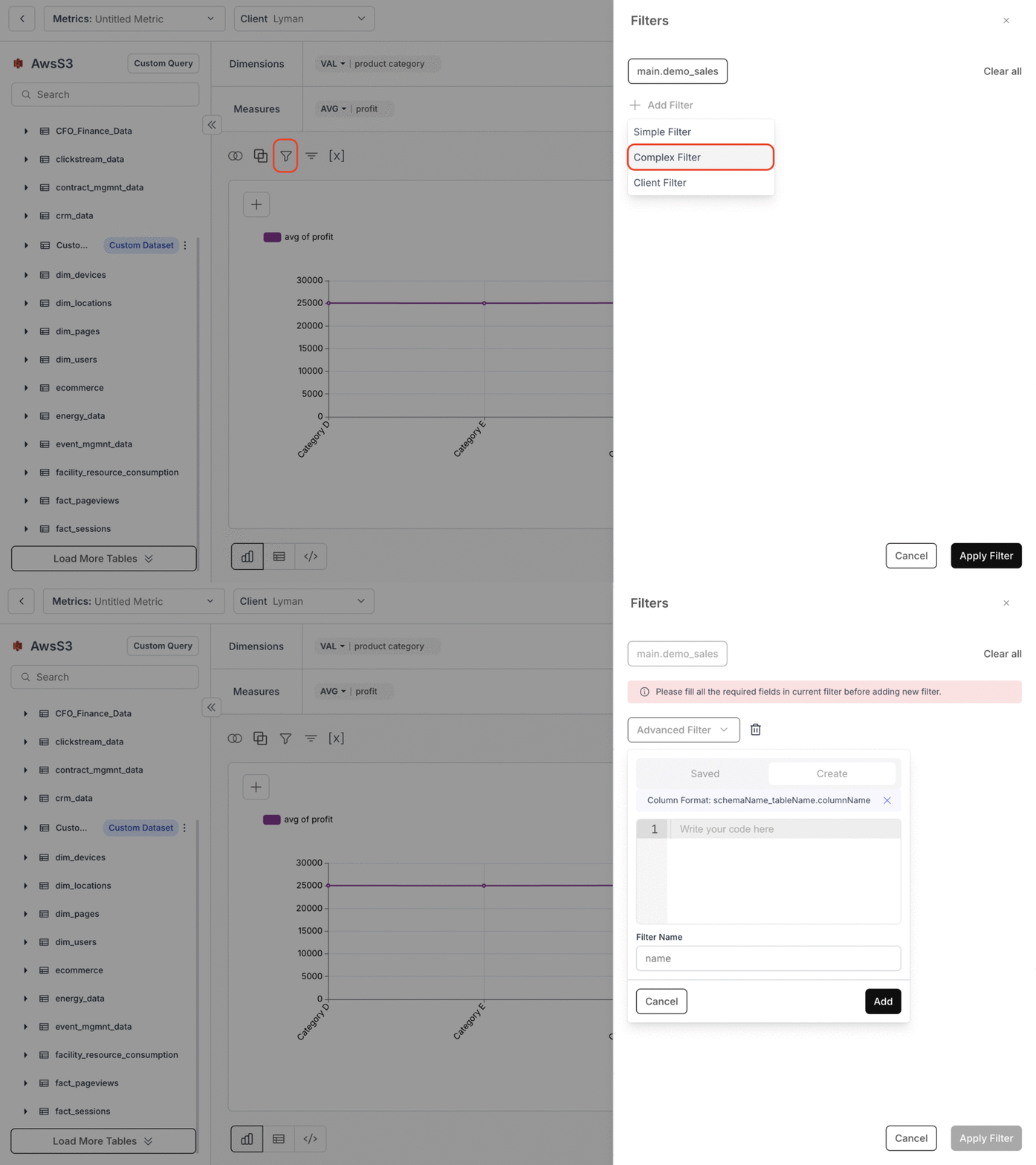
### Accessing Complex Filter
1. Click on the filter (funnel) icon.
2. Select **"+ Add Filter"**.
3. Choose **"Complex Filter"** from the list.
4. A modal will appear to add the custom **WHERE** clause.
 ### Using Complex Filter without Custom SQL
* You can write complex filters for any table that is part of the dimensions/measures.
* Example columns in Dimensions/Measures: `"public_table1"."country"`, `"public_table2"."location"`, `"public_table1"."population"`
* For the above, below will be our generated SQL:
```sql theme={"dark"}
SELECT
"public_table1"."country" AS "country",
"public_table2"."location" AS "location",
"public_table1"."population" AS "population"
FROM
"public"."table1" AS "public_table1"
INNER JOIN "public"."table2" AS "public_table2" ON "public_table2"."code" = "public_table1"."code"
LIMIT 100
```
* Example Complex Filter that you can write:
```sql theme={"dark"}
"public_table2"."location" = UPPER("public_table1"."country")
"public_table1"."population" > 100000
```
### Using Complex Filter with Custom SQL
* When writing a custom SQL query, the complex filter can only address columns of the table `"dbn_sql_table"`.
* Example Custom SQL that you write:
```sql theme={"dark"}
SELECT
"country" AS "country",
"population" AS "population"
FROM
"public"."table"
```
* The SQL generated by us:
```sql theme={"dark"}
SELECT
"country" AS "country",
"population" AS "population"
FROM
(
SELECT
"country" AS "country",
"population" AS "population"
FROM
"public"."table"
) AS "dbn_sql_table"
```
**Example Complex Filter with Custom SQL:**
* Example Complex Filter that you can write:
```sql theme={"dark"}
"dbn_sql_table"."population" > 100000
"dbn_sql_table"."location" = 'Japan'
```
You’ve successfully applied a Complex Filter in Databrain! Your advanced filtering logic is now in effect, enabling deeper and more precise data analysis.
### Using Complex Filter without Custom SQL
* You can write complex filters for any table that is part of the dimensions/measures.
* Example columns in Dimensions/Measures: `"public_table1"."country"`, `"public_table2"."location"`, `"public_table1"."population"`
* For the above, below will be our generated SQL:
```sql theme={"dark"}
SELECT
"public_table1"."country" AS "country",
"public_table2"."location" AS "location",
"public_table1"."population" AS "population"
FROM
"public"."table1" AS "public_table1"
INNER JOIN "public"."table2" AS "public_table2" ON "public_table2"."code" = "public_table1"."code"
LIMIT 100
```
* Example Complex Filter that you can write:
```sql theme={"dark"}
"public_table2"."location" = UPPER("public_table1"."country")
"public_table1"."population" > 100000
```
### Using Complex Filter with Custom SQL
* When writing a custom SQL query, the complex filter can only address columns of the table `"dbn_sql_table"`.
* Example Custom SQL that you write:
```sql theme={"dark"}
SELECT
"country" AS "country",
"population" AS "population"
FROM
"public"."table"
```
* The SQL generated by us:
```sql theme={"dark"}
SELECT
"country" AS "country",
"population" AS "population"
FROM
(
SELECT
"country" AS "country",
"population" AS "population"
FROM
"public"."table"
) AS "dbn_sql_table"
```
**Example Complex Filter with Custom SQL:**
* Example Complex Filter that you can write:
```sql theme={"dark"}
"dbn_sql_table"."population" > 100000
"dbn_sql_table"."location" = 'Japan'
```
You’ve successfully applied a Complex Filter in Databrain! Your advanced filtering logic is now in effect, enabling deeper and more precise data analysis.