> ## Documentation Index
> Fetch the complete documentation index at: https://docs.usedatabrain.com/llms.txt
> Use this file to discover all available pages before exploring further.

# SSO Login

> To enable Single Sign-On (SSO) for your application, you can integrate either a SAML or OIDC Identity Provider (IdP).

<Steps>
  <Step>
    Navigate to "Settings" page and "\</> MFA & SSO Settings" section
  </Step>

  <Step>
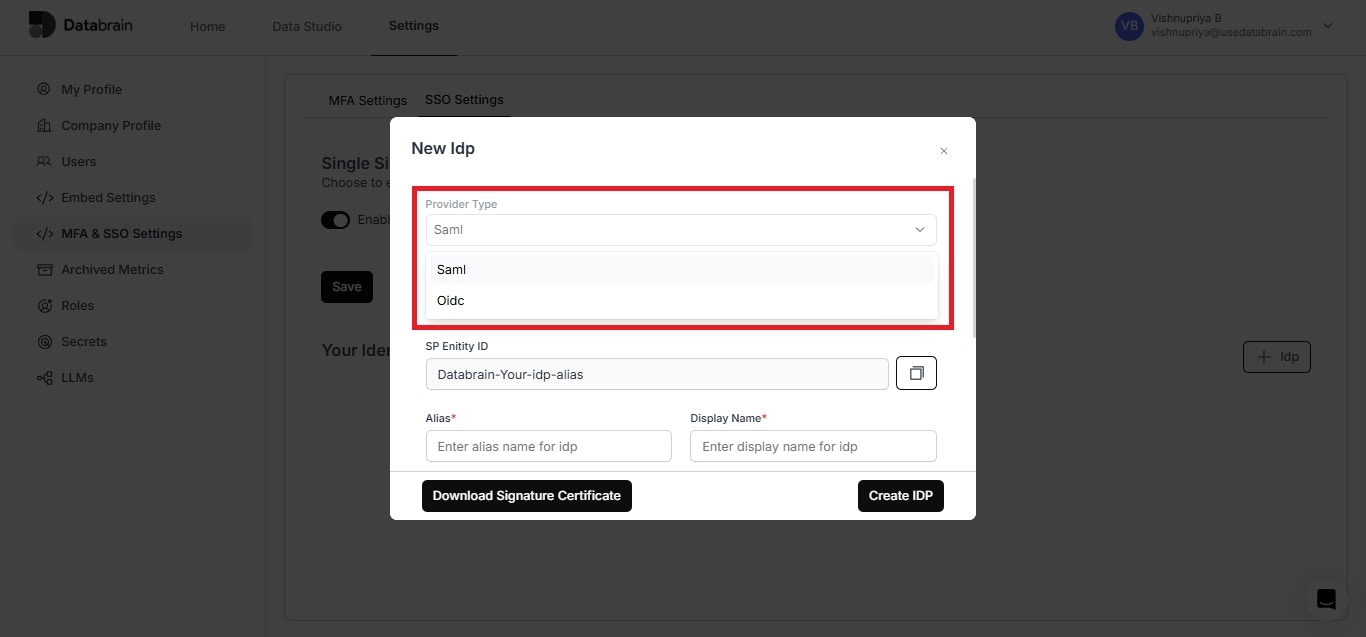
    In the "SSO Settings" section, enable the toggle and click on "+Idp"
  </Step>

  <Step>
    You can choose either "Saml" or "Oidc" Idp
  </Step>
</Steps>

<Frame>
  <img src="https://mintcdn.com/databrainlabs-bef6850a/4wZlBKZskJWgCs2c/images/developer-docs/image-1.png?fit=max&auto=format&n=4wZlBKZskJWgCs2c&q=85&s=a9601543ebf84fa0af04eeebeeae2733" alt="" width="1366" height="637" data-path="images/developer-docs/image-1.png" />
</Frame>

For Saml configuration, please refer the below link:

<CardGroup cols={2}>
  <Card title="Saml Identity Provider (Idp)" icon="id-card" horizontal="false" href="https://docs.usedatabrain.com/guides/onboarding-and-configuration/sso-login/saml-identity-provider-idp" />
</CardGroup>

For Oidc configuration, please refer the below link:

<CardGroup cols={2}>
  <Card title="Oidc Identity Provider (Idp)" icon="user-plus" horizontal={false} href="https://docs.usedatabrain.com/guides/onboarding-and-configuration/sso-login/oidc-identity-provider-idp" />
</CardGroup>
