

At a Glance: DataBrain uses a stateless token-based architecture that enables secure, multi-tenant embedded analytics. This guide explains the core concepts and architecture patterns.
How Embedding Works
DataBrain’s embedding architecture is built on five core components that work together to deliver secure, real-time analytics:Your Application
Your frontend and backend where dashboards are embedded
DataBrain Platform
Analytics engine that processes queries and renders visualizations
Your Database
Your production database or data warehouse (your data never leaves)
Guest Tokens
Stateless authentication for secure, multi-tenant access
Architecture Flow
Cloud Deployment
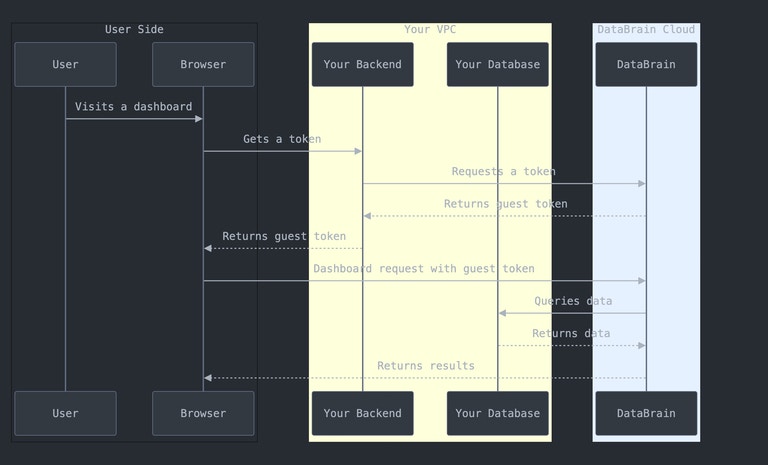
1
User Logs In
Your user authenticates with your application
2
Generate Token
Your backend requests a guest token from DataBrain API with user context
3
Embed Dashboard
Your frontend receives the token and embeds the DataBrain component
4
Query & Render
DataBrain queries your database directly and streams results to the embedded component
Data Security: Your data never passes through DataBrain’s storage. Queries execute directly against your database, and results stream to the end user.
Self-Hosted Deployment
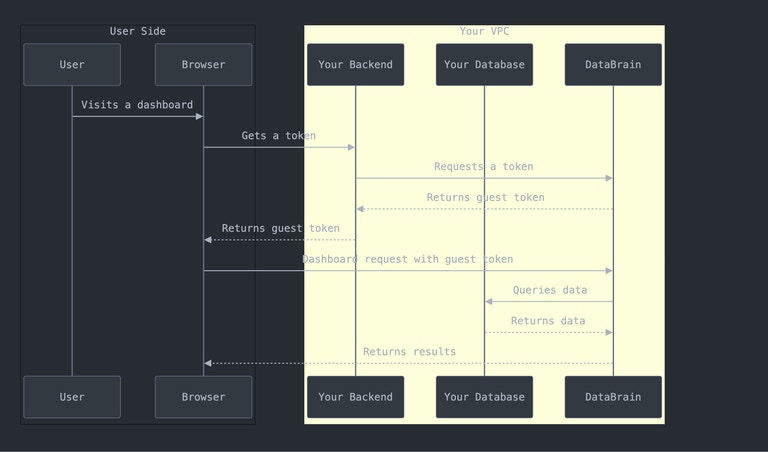
- Complete control over data and infrastructure
- Network isolation - everything stays within your VPC
- Custom deployment options (single server, HA, multi-region)
- Air-gapped support for isolated environments
Key Architecture Concepts
Stateless Guest Tokens
DataBrain uses stateless tokens instead of traditional user authentication: Benefits:- ✅ No user data storage - complete privacy
- ✅ No SSO setup required - integrate in minutes
- ✅ Multi-tenant isolation built-in
- ✅ Automatic expiration for security
- ✅ Opaque server-side tokens — nothing to forge or decode client-side
Multi-Tenant Data Isolation
DataBrain supports N-level tenancy hierarchy (industry-unique):1. Datasource Level
1. Datasource Level
Route different customers to completely different database servers. Perfect for dedicated database per enterprise customer.
2. Database Level
2. Database Level
Switch databases based on tenant within the same database server.
3. Schema Level
3. Schema Level
Isolate tenants in separate schemas within the same database.
4. Table/Row Level
4. Table/Row Level
Apply row-level security filters to ensure users only see their data.
Real-Time Query Execution
- How Queries Work
- Performance
- Security
- User interacts with embedded dashboard
- Component sends authenticated request
- DataBrain validates token and permissions
- Generates optimized SQL with RLS applied
- Executes directly against your database
- Streams results back to user
Deployment Options
Cloud vs Self-Hosted
Choose the deployment that fits your needs:- Cloud Deployment
- Self-Hosted
Best for:
- Fast time-to-market
- Minimal DevOps resources
- Automatic updates
- Built-in scalability
- DataBrain hosts the platform
- Connects securely to your database
- 99.9% uptime SLA
- Auto-scaling included
- VPC peering available (AWS)
- IP whitelisting
- SOC 2, ISO 27001, GDPR compliant
- Encrypted connections (TLS 1.2+)
Security & Compliance
Data Protection
Encryption
At Rest: AES-256 encryption for credentialsIn Transit: TLS 1.2+ for all connectionsPasswords: One-way hashing, never stored
Access Control
Token-based: Stateless guest tokensRow-Level: Automatic RLS enforcementPermissions: Fine-grained access control
Network Security
VPC Peering: Private connections (AWS)IP Whitelist: Restrict access by IPDomain Whitelist: Control embedding domains
Compliance
SOC 2 Type II: Security auditsISO 27001: Information securityGDPR & HIPAA: Data protection
Best Practices
API Key Security
API Key Security
- Store API keys in environment variables
- Never expose keys in frontend code
- Rotate keys periodically
- Use separate keys per environment
Token Configuration
Token Configuration
- Set reasonable expiration times (1-24 hours)
- Refresh tokens before expiration
- Shorter expiry = better security
- Include RLS rules in token generation
Domain Whitelisting
Domain Whitelisting
- Whitelist only necessary domains
- Remove development domains in production
- Always use HTTPS in production
- Review whitelist regularly
When to Use What
DataBrain Cloud
Choose when:
- You want fast deployment
- You have limited DevOps resources
- You need automatic scaling
- You want managed infrastructure
- SaaS startups
- Small to medium businesses
- Teams without dedicated DevOps
Self-Hosted
Choose when:
- You have strict data residency requirements
- You need complete infrastructure control
- You operate in air-gapped environments
- You have specific compliance needs
- Financial institutions
- Healthcare organizations
- Government agencies
- Large enterprises
Next Steps
Quick Start
Get your first dashboard embedded in 5 minutes
Production Setup
Complete production deployment guide
Architecture Deep Dive
Detailed technical architecture and implementation
Security Guide
Comprehensive security documentation
Common Questions
Does DataBrain store my analytics data?
Does DataBrain store my analytics data?
No. DataBrain only stores metadata like dashboard configurations and metric definitions. Your actual data stays in your database. Queries execute in real-time against your database.
How does multi-tenancy work?
How does multi-tenancy work?
DataBrain supports 4-level tenancy: datasource, database, schema, and row-level. You can route users to different databases or apply row-level security filters - whatever matches your architecture.
What happens if DataBrain goes down?
What happens if DataBrain goes down?
Cloud: 99.9% uptime SLA with automatic failover and redundancy.Self-hosted: Availability depends on your infrastructure. You can deploy with high-availability configurations.
Can I use multiple databases?
Can I use multiple databases?
Yes! DataBrain supports multi-datasource workspaces. You can route different customers to different databases, even across different database types.
How are guest tokens secured?
How are guest tokens secured?
Tokens are opaque UUIDs issued and stored server-side — there is nothing to decode or forge client-side, and there is no signing key to manage. They’re validated against the server on every request, can be configured to expire, and include origin checking to prevent unauthorized use.