

At a Glance: DataBrain uses bank-level AES-256 encryption, supports enterprise SSO and MFA, provides fine-grained access controls, and maintains SOC 2 Type II, ISO 27001, GDPR, and HIPAA compliance.
Compliance & Certifications
DataBrain Cloud is certified and compliant with major security and privacy standards: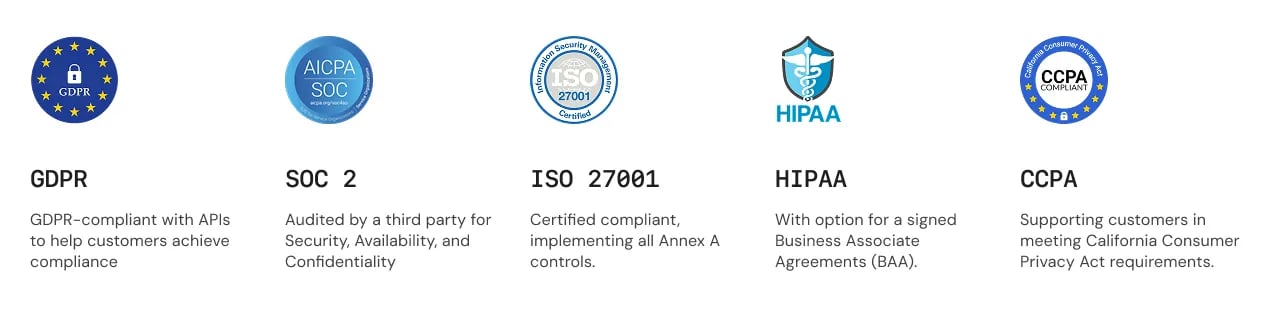
Self-Hosted Deployments: Compliance depends on your infrastructure configuration. DataBrain provides all the security features and controls needed to achieve these compliance standards.
Data Protection
Encryption - Bank-Level Security
Industry Standard: We use the same AES-256 encryption used by banks and government agencies to protect your data.Data at Rest - AES-256 Encryption
Data at Rest - AES-256 Encryption
Everything is encrypted when stored:
- User credentials and passwords (hashed and salted)
- Database connection strings and credentials
- API keys and authentication tokens
- Dashboard and metric configurations
- Audit logs and activity records
Data in Transit - TLS 1.2+ HTTPS
Data in Transit - TLS 1.2+ HTTPS
All communications are encrypted:
- Login and authentication requests
- Dashboard and metric data transfers
- API requests and responses
- File uploads and downloads
- WebSocket connections for real-time updates
Password Protection
Password Protection
Your passwords are never stored in plain text:
- One-way hashing using industry-standard algorithms
- Unique salt per password (even identical passwords have different hashes)
- Cannot be decrypted by anyone, including DataBrain staff
- Password resets create new passwords rather than retrieving old ones
Database Connection Security
- SSL/TLS Encryption
- VPC Peering
- Read-Only Access
All database connections are encrypted:
- PostgreSQL, MySQL, SQL Server with SSL/TLS
- Snowflake and BigQuery (encrypted by default)
- Redshift, Databricks, and all supported databases
Multi-Tenant Data Isolation
Complete data separation for SaaS applications and multi-client environments:Row-Level Security
Users see only their authorized data
Automatic Filtering
Applied automatically to all queries
Client Isolation
Complete separation by client ID
How Multi-Tenant Isolation Works
How Multi-Tenant Isolation Works
In a SaaS application:
- Generate guest token with unique client ID
- DataBrain automatically filters all data by that client
- Client A sees only Client A’s data
- Client B sees only Client B’s data
- Zero cross-client data access - complete isolation
Row-Level Security (RLS)
Row-Level Security (RLS)
Fine-grained data access control:
- Filter data based on user attributes (role, department, region, etc.)
- Applied automatically to all queries
- Transparent to end users
- Centrally managed and configured
User Authentication
Choose the authentication method that fits your security requirements:Email & Password
Traditional authentication with strong password policies and account protection
Single Sign-On (SSO)
Enterprise SSO with SAML, OIDC, Google Workspace, and Microsoft 365
One-Time Password (OTP)
Passwordless authentication via secure email codes
Multi-Factor Authentication
Additional security layer with authenticator apps, SMS, or email
Single Sign-On (SSO)
Connect DataBrain with your existing identity provider for centralized user management:- SAML 2.0
- OpenID Connect
- Google & Microsoft
Enterprise Identity Providers:
- Okta
- Azure Active Directory
- OneLogin
- Auth0
- Any SAML 2.0 compliant provider
Multi-Factor Authentication (MFA)
Highly Recommended: Enable MFA for all administrator accounts. MFA blocks 99.9% of automated attacks.Authenticator Apps (Most Secure)
Authenticator Apps (Most Secure)
Time-based one-time passwords (TOTP):
- Google Authenticator
- Microsoft Authenticator
- Authy
- Any TOTP-compatible app
SMS/Text Message
SMS/Text Message
Receive verification codes via text:
- Works on any mobile phone
- No app installation required
- Good for occasional use
Email Verification
Email Verification
Get verification codes via email:
- No additional device required
- Good for backup method
- Delivered to your registered email
Session Management
Automatic session security keeps your account protected:Auto Refresh
Auto Refresh
Sessions automatically refresh while you’re active - no interruptions to your work.
Idle Timeout
Idle Timeout
Automatic logout after 30 minutes of inactivity protects your account on shared devices.
Remember Me
Remember Me
Stay logged in on trusted devices for up to 7 days (optional feature).Important: Don’t use “Remember Me” on public or shared computers.
Device Management
Device Management
View and manage active sessions across all your devices. Remotely log out from any device.
Access Control & Permissions
DataBrain uses role-based access control (RBAC) to ensure users have appropriate access: Principle of Least Privilege: Always grant the minimum permissions needed. Start with Viewer role and escalate only when necessary.User Roles
- Viewer
- Editor
- Admin
Perfect for: Stakeholders, executives, business usersCan Do:
- View dashboards and metrics
- Filter and explore data
- Download reports and exports
- Apply dashboard filters
- Create or edit content
- Modify configurations
- Manage users or settings
Custom Roles
When to Create Custom Roles
When to Create Custom Roles
Create custom roles for specific use cases:
- Department-specific access - “Sales Analyst” role with sales dashboard access only
- Client-facing roles - Limited viewer with export restrictions
- Temporary project access - Time-limited elevated permissions
- Specialized workflows - Custom permission combinations
Best Practices
Best Practices
Follow these guidelines:
- Start with standard roles (Viewer, Editor, Admin)
- Grant minimum necessary permissions
- Review permissions quarterly
- Remove inactive accounts after 30 days
- Document custom role purposes
- Test permission changes before deployment
Token Management
DataBrain uses secure tokens for API access and embedded analytics:API Tokens
For Backend Integration
- Long-lived tokens for server applications
- Scoped permissions (read, write, admin)
- Production and test environments
- Can be revoked instantly
Guest Tokens
For Embedded Dashboards
- Short-lived tokens for end users
- Automatic client data filtering
- Domain whitelisting
- Usage tracking and analytics
API Tokens
Security Critical: Never expose API tokens in frontend code, GitHub, or client-side applications. Always generate tokens on your backend server.How to Create API Tokens
How to Create API Tokens
Step-by-step process:
- Navigate to Data Apps → Select your app
- Click Generate API Token
- Set descriptive name (e.g., “Production Dashboard API”)
- Choose scopes (read, write, delete)
- Set expiration date (recommended: 1 year)
- Copy token immediately - it won’t be shown again!
- Store securely in password manager or secrets vault
prod-dashboard-2024 to track token purposes.Token Scopes
Token Scopes
Grant only necessary permissions:
- Read - View dashboards and metrics (for embedding)
- Write - Create and modify content (for integrations)
- Delete - Remove resources (use sparingly)
- Admin - Full access (only for administrative tools)
Best Practices
Best Practices
Keep your tokens secure:
- Store tokens in environment variables
- Use separate tokens for dev/staging/production
- Rotate tokens every 6 months
- Revoke unused tokens immediately
- Monitor token usage for anomalies
- Never commit tokens to version control
Guest Tokens
For secure embedded analytics in customer-facing applications:Security Features
Security Features
Built-in protection:
- Domain Whitelisting - Only works on approved domains
- Client Filtering - Automatic data filtering by client ID
- Expiration Control - Set time limits (recommended: 1 year with auto-renewal)
- Usage Tracking - Monitor access for billing and security
Common Use Cases
Common Use Cases
Where to use guest tokens:
- Customer portals with personalized dashboards
- Partner dashboards with specific metrics
- Mobile app analytics integrations
- Public reports on websites
- Embedded analytics in SaaS applications
Domain Whitelisting
Domain Whitelisting
Restrict where dashboards can be embedded:
- Whitelist entries are scheme-less
host[:port]— do not includehttp://orhttps://(the API rejects entries with a protocol) - Specify exact domains:
app.yourcompany.com - Support subdomains:
*.yourcompany.com(use carefully) - Include the port for local dev:
localhost:3000 - Never use wildcard
*for all domains - Serve your embedding pages over HTTPS in production (the scheme just isn’t part of the whitelist entry)
Platform Security
API Protection
Every API request is secured with multiple protection layers:Authentication Required
All requests must be authenticated with valid tokens
HTTPS Only
TLS 1.2+ encryption enforced for all connections
Rate Limiting
Automatic protection against abuse and DDoS
Security Headers
Security Headers
Industry-standard HTTP security headers applied to all responses:
- Strict-Transport-Security - Forces HTTPS connections
- X-Frame-Options - Prevents clickjacking attacks
- X-Content-Type-Options - Prevents MIME type sniffing
- Content-Security-Policy - Controls resource loading
- X-XSS-Protection - Enables browser XSS filters
Rate Limiting
Rate Limiting
Protects against abuse and ensures fair usage:
Need higher limits for your use case? Contact support to discuss custom rate limits.
Audit Logging
Audit Logging
Complete visibility into system activity:What’s logged:
- User login/logout events
- Permission changes
- Data access patterns
- API token usage
- Configuration changes
- Failed authentication attempts
- Security monitoring and threat detection
- Compliance and audit requirements
- Troubleshooting and debugging
- Usage analytics
Embedded Analytics Security
Secure your embedded dashboards with built-in protection:Domain Whitelisting
Critical Security Control: Always restrict which domains can embed your dashboards. Never use wildcard* for all domains.
How to configure:
- Specify exact allowed domains in guest token settings
- Use HTTPS only (never HTTP in production)
- Be specific - avoid broad wildcards when possible
- Good:
https://app.yourcompany.com - Good:
https://dashboard.yourcompany.com - Use carefully:
https://*.yourcompany.com(all subdomains) - Never:
*(all domains)
Client Data Isolation
Automatic data separation for multi-tenant applications:How It Works
How It Works
Complete data isolation in 4 simple steps:
- Generate guest token with unique client ID on your backend
- Embed dashboard in your application with that token
- DataBrain filters all data automatically by client ID
- Client sees only their data - zero cross-client access
Benefits
Benefits
Why automatic client filtering matters:
- No manual filtering code needed
- Impossible to bypass (enforced at database level)
- Works across all queries automatically
- Scales to thousands of clients
- Complete data isolation guaranteed
Self-Hosted Security
Additional security measures for self-hosted deployments: Your Responsibility: For self-hosted installations, you’re responsible for infrastructure security. Follow these best practices to maintain a secure deployment.Server Hardening
Server Hardening
Secure your server infrastructure:
- Keep OS and software updated with latest security patches
- Configure firewall rules (allow only necessary ports)
- Disable unnecessary services and features
- Use SSH key authentication (disable password auth)
- Implement fail2ban to block brute force attempts
- Set up automatic security updates
- Use strong, unique passwords for all accounts
SSL/TLS Configuration
SSL/TLS Configuration
Enforce encrypted connections:
- Use valid certificates from trusted CA (Let’s Encrypt is free)
- Enable automatic certificate renewal
- Support TLS 1.2 or higher only
- Disable weak cipher suites
- Enable HSTS header
- Test SSL configuration regularly
Database Security
Database Security
Protect your database:
- Use strong, unique passwords (20+ characters)
- Enable SSL/TLS for all connections
- Limit network access (whitelist IPs only)
- Use read-only credentials for DataBrain
- Encrypt data at rest
- Set up automated daily backups
- Test backup restoration monthly
Monitoring & Alerts
Monitoring & Alerts
Stay informed about security events:System Monitoring:
- CPU, memory, and disk usage
- Network traffic patterns
- Application error rates
- Service health checks
- Failed login attempts
- Unusual access patterns
- Configuration changes
- Certificate expiration
Backup Strategy
Backup Strategy
Implement reliable backups:What to backup:
- Database (all data)
- Application files and configurations
- User uploads and assets
- SSL certificates
- Full backup: Weekly
- Incremental: Daily
- Test restores: Monthly
- Encrypt all backups
- Store off-site (different location/region)
- Retain for 30+ days
- Document restore procedures
Related Documentation
Guest Token API
Learn how to generate secure guest tokens for embedded analytics
Proxy Authentication
Enhanced security by managing tokens on your backend server
Multi-Tenant Access Control
Implement complete data isolation for multi-tenant applications
API Documentation
Complete API reference with authentication examples
Additional Resources
Security Overview
Comprehensive security information and certifications
Privacy Policy
How we collect, use, and protect your personal data
Cookie Policy
Information about our use of cookies and tracking technologies
Need Help?
Security Questions
Contact DataBrain support for security assistance or to report security vulnerabilities
Compliance Discussions
Reach out to discuss SOC 2, HIPAA, GDPR, or other compliance requirements
Last Updated: December 2025 | Version: 2.0