

For Technical Teams: This guide provides detailed technical documentation of DataBrain’s embedding architecture, including authentication flows, query execution paths, performance optimizations, and advanced deployment patterns.
Prerequisites:
- Familiarity with REST APIs and authentication concepts
- Understanding of database query execution
- Basic knowledge of cloud infrastructure (for deployment sections)
Authentication & Security Flow
Token Generation Process
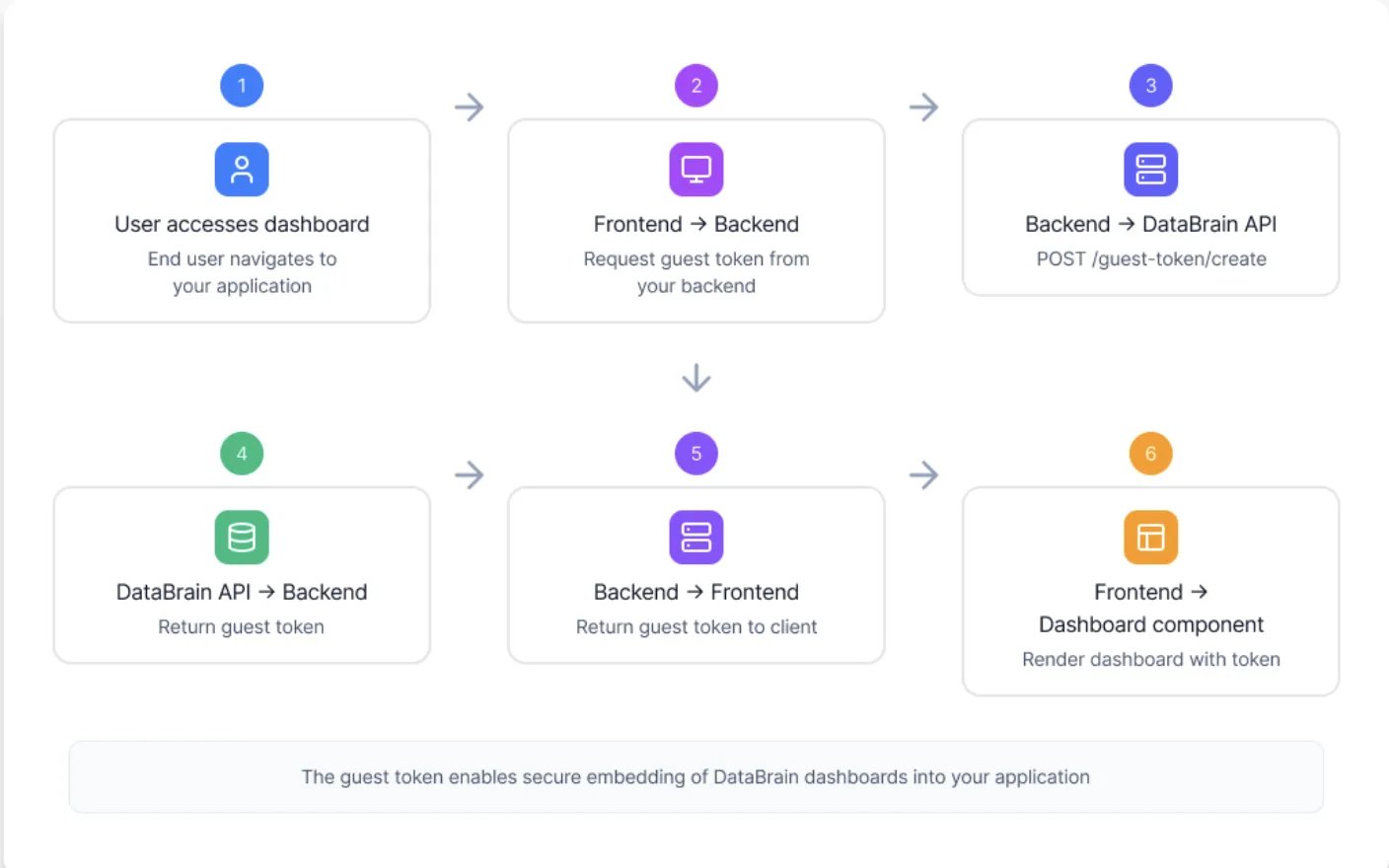
- Token Creation
- Token Validation
- Domain Whitelisting
- RLS Application
Step 1: Your backend authenticates with DataBrain
Your API key should only be used server-side. Never expose it to the frontend.
Security Best Practices
API Key Security
- Store API keys in environment variables
- Never expose API keys in frontend code
- Rotate API keys periodically
- Use separate keys for dev/staging/production
Token Configuration
- Set reasonable expiration times (1-24 hours)
- Refresh tokens before expiration
- Generate new tokens on user session refresh
- Shorter expiry = better security
Domain Whitelisting
- Whitelist only necessary domains
- Remove development domains in production
- Use HTTPS in production (required)
- Review whitelist regularly
Row-Level Security
- Define RLS rules for all tables
- Test RLS rules thoroughly
- Use parameterized queries
- Avoid SQL injection vulnerabilities
Data Flow Architecture
Query Execution Path
Understanding how queries flow through the system:1
User Interaction
End user interacts with embedded dashboard:
- Applies filters
- Changes date ranges
- Drills down into data
- Refreshes metrics
2
Component Generates Request
Web component constructs authenticated API request with the guest token and sends it to DataBrain to fetch metric data with any applied filters.
3
DataBrain Validates & Processes
DataBrain processing pipeline:
- Validate token: Look up the token server-side; check expiration, permissions
- Retrieve metric: Load metric configuration from metadata
- Apply filters: Merge user filters with app filters
- Generate SQL: Create optimized query
- Apply RLS: Wrap query with row-level security
- Check cache: Look for cached results (optional)
4
Database Execution
Query executes against your database:
5
Result Processing
DataBrain processes query results:
- Format data for visualization
- Apply number formatting
- Calculate aggregations
- Handle null values
- Apply currency conversions (if configured)
6
Response & Rendering
Results streamed to frontend:Component renders interactive chart with your theme.
Performance Optimizations
Query Caching
Query Caching
Reduce database load with intelligent caching:
- Time-based caching: Cache results for configurable TTL (default: 24 hours)
- Per-tenant caching: Cache keys include query hash, datasource ID, filters, and workspace ID — ensuring tenant isolation
- Two caching modes: Use DataBrain’s managed Redis or bring your own Redis/Elasticache
- Graceful degradation: Cache failures never block queries — DataBrain falls back to direct database execution
Cache Configuration Guide
Complete guide to configuring query caching
Connection Pooling
Connection Pooling
Efficient database connection management:
- Connection pool per datasource
- Automatic connection recycling
- Configurable pool size
- Connection health checks
- Query timeout management
Query Optimization
Query Optimization
Automatic query optimization:✅ Push-down filters to database
✅ Minimize data transfer
✅ Use appropriate indexes
✅ Parallel query execution
✅ Result streaming for large datasets
✅ Automatic query planning
✅ Minimize data transfer
✅ Use appropriate indexes
✅ Parallel query execution
✅ Result streaming for large datasets
✅ Automatic query planning
Frontend Optimization
Frontend Optimization
Fast-loading embedded components:
- Lazy loading of visualizations
- Progressive rendering
- Debounced filter updates
- Virtual scrolling for tables
- Compressed data transfer
- CDN delivery of assets
Advanced Architecture Patterns
Proxy Mode Architecture
For enhanced security, route all requests through your own proxy server: Benefits of proxy mode:- Guest tokens never exposed to frontend
- Additional authentication layer
- Request/response modification
- Custom logging and monitoring
- API rate limiting
- Request validation
Learn More
Complete guide to implementing proxy authentication
Multi-Datasource Architecture
Support customers with data in different databases:- Dedicated database per enterprise customer
- Multi-region data residency
- Database sharding strategies
- Read replica routing
Multi-Datasource Setup
Configure multi-datasource workspaces
High-Availability Architecture
Deploy DataBrain with redundancy and failover:- Load Balancing
- Database Redundancy
- Caching Layer
Horizontal scaling with load balancers:
- Multiple application servers
- Session affinity (sticky sessions)
- Health check endpoints
- Automatic failover
Deployment Considerations
Cloud vs Self-Hosted Comparison
- Cloud Deployment
- Self-Hosted
Best for:
- Fast time-to-market
- Minimal DevOps resources
- Automatic updates and maintenance
- Built-in scalability
- Lower initial investment
- Data passes through DataBrain infrastructure
- Requires internet connectivity
- Less customization options
- Monthly/annual subscription pricing
Self-Hosted Deployment
1
Infrastructure Setup
Required components:
- DataBrain Application Server (Node.js)
- PostgreSQL Database (metadata storage)
- Redis Cache (session & query caching)
- Web UI (admin interface)
Deployment instructions and installation packages are provided in your self-hosted license package.
2
Database Configuration
Connect to your databases:
- Private network connections within VPC
- Connection pooling configuration
- SSL/TLS certificate setup
- Read replica configuration (optional)
3
Environment Variables
Configure required environment variables:
4
Configure SSL/TLS
Set up HTTPS for production:
- Obtain SSL certificates
- Configure reverse proxy (nginx/Apache)
- Enable HTTPS enforcement
- Set up certificate auto-renewal
5
Start Services
Launch DataBrain platform:Refer to your self-hosted package for specific deployment commands based on your infrastructure (Docker, Kubernetes, VMs).
Infrastructure Sizing Guide
Estimate your resource requirements:Sizing factors to consider:
- Dashboard complexity (number of metrics)
- Query complexity and execution time
- Cache hit rate
- Number of dashboards per user
- Refresh rate requirements
Monitoring & Observability
Key Metrics to Monitor
Application Metrics
- Request rate and latency
- Error rates and types
- Token validation success rate
- API endpoint performance
Database Metrics
- Query execution time
- Connection pool utilization
- Cache hit/miss ratio
- Failed query rate
User Metrics
- Concurrent users
- Dashboard load times
- User session duration
- Feature usage patterns
Infrastructure Metrics
- CPU and memory utilization
- Network throughput
- Disk I/O and space
- Container/pod health
Health Check Endpoints
DataBrain provides health check endpoints for liveness and readiness (including Hasura, Keycloak, and Postgres). See Health Check APIs for full details.Recommended Monitoring Stack
- Application Monitoring
- Database Monitoring
- Infrastructure
- Logging
Tools:
- DataDog / New Relic: Full-stack APM
- Prometheus + Grafana: Open-source metrics
- CloudWatch: AWS native monitoring
- API response times
- Error rate tracking
- Token generation rate
- Active sessions
Troubleshooting & Debugging
Common Issues
Token Validation Failures
Token Validation Failures
Symptoms:
- “UNAUTHORIZED” errors
- “TOKEN_EXPIRED” messages
- “UNAUTHORIZED_ORIGIN” errors
- Verify API key is correct and active
- Check token expiration time
- Ensure domain is whitelisted
- Verify token is being sent correctly
- Check for clock skew between systems
Slow Query Performance
Slow Query Performance
Symptoms:
- Dashboards loading slowly
- Timeouts on complex queries
- High database load
- Enable query caching
- Add database indexes
- Optimize RLS rules
- Increase connection pool size
- Use read replicas for analytics
- Review query execution plans
Connection Pool Exhaustion
Connection Pool Exhaustion
Symptoms:
- “Too many connections” errors
- Intermittent connection failures
- Slow response times
- Increase max connections in pool config
- Reduce connection idle timeout
- Scale application horizontally
- Optimize query execution time
- Check for connection leaks
Cache Issues
Cache Issues
Symptoms:
- Stale data displayed
- Inconsistent results
- Memory warnings
- Reduce cache TTL
- Clear cache manually if needed
- Increase Redis memory
- Review cache invalidation logic
- Check cache hit rate
Debug Mode
Enable debug logging for troubleshooting:- Component lifecycle events
- API requests and responses
- Token validation steps
- Error details
Next Steps
Production Setup
Complete step-by-step production deployment guide
Security Guide
Comprehensive security and compliance documentation
Multi-Tenancy
Implement row-level security for multi-tenant apps
API Reference
Complete API documentation for token generation
Proxy Authentication
Advanced proxy mode implementation
Self-Hosted Config
Self-hosted deployment configuration
Additional Resources
Architecture FAQs
Architecture FAQs
Q: How are queries optimized?
A: DataBrain applies push-down filters, uses connection pooling, generates indexed queries, and caches results based on your configuration.Q: What database permissions are required?
A: DataBrain only needs SELECT permissions on the tables you want to query. No write access is required.Q: How is high availability achieved?
A: Cloud deployments have built-in HA. Self-hosted can deploy with load balancers, multiple app servers, and database replicas.Q: Can I customize query generation?
A: While DataBrain optimizes queries automatically, you can control them through metric definitions and filter configurations.Q: What’s the token refresh strategy?
A: Generate new tokens before expiration (e.g., when token has 10% life remaining). Your backend should handle this automatically.
A: DataBrain applies push-down filters, uses connection pooling, generates indexed queries, and caches results based on your configuration.Q: What database permissions are required?
A: DataBrain only needs SELECT permissions on the tables you want to query. No write access is required.Q: How is high availability achieved?
A: Cloud deployments have built-in HA. Self-hosted can deploy with load balancers, multiple app servers, and database replicas.Q: Can I customize query generation?
A: While DataBrain optimizes queries automatically, you can control them through metric definitions and filter configurations.Q: What’s the token refresh strategy?
A: Generate new tokens before expiration (e.g., when token has 10% life remaining). Your backend should handle this automatically.
Performance Tuning Tips
Performance Tuning Tips
Application Level:
- Enable query caching with appropriate TTL
- Use connection pooling (adjust based on load)
- Implement CDN for static assets
- Enable compression for API responses
- Create indexes on filtered columns
- Use read replicas for analytics workload
- Optimize RLS queries for performance
- Monitor slow query log
- Scale horizontally with load balancing
- Use Redis cluster for caching layer
- Deploy close to your database (reduce latency)
- Implement proper monitoring and alerting
Security Certifications
Security Certifications
DataBrain maintains industry-leading security certifications:
- SOC 2 Type II: Annual audits of security controls
- ISO 27001: Information security management
- GDPR: European data protection compliance
- HIPAA: Healthcare data protection (self-hosted)
- PCI DSS: Payment card data security
Support Resources
Support Resources
Need technical support?
- 📚 Documentation: docs.usedatabrain.com
- 💬 Contact support through your DataBrain dashboard