

Cache Settings
DataBrain supports query result caching to reduce database load and improve dashboard performance. You can either use DataBrain’s managed cache or bring your own Redis/Elasticache instance.Cache is configured per workspace. Each workspace can independently choose its caching mode and settings.
Caching Modes
- DataBrain Caching (Managed)
- Bring Your Own Cache (BYOC)
Best for: Teams that want fast setup without managing Redis infrastructure.DataBrain provides a managed Redis instance. You only need to enable it and set a TTL — no host, port, or password configuration required.How it works:
- Toggle “Cache Settings” to enable caching
- Enable the “Databrain Caching” option
- Set your desired cache expiration (in seconds)
- Click Save
With DataBrain Caching, cached query results are stored in DataBrain’s managed Redis instance. If data residency is a concern, consider using Bring Your Own Cache instead.
Configuration Reference
Navigate to Workspace Settings → Cache Settings to configure caching.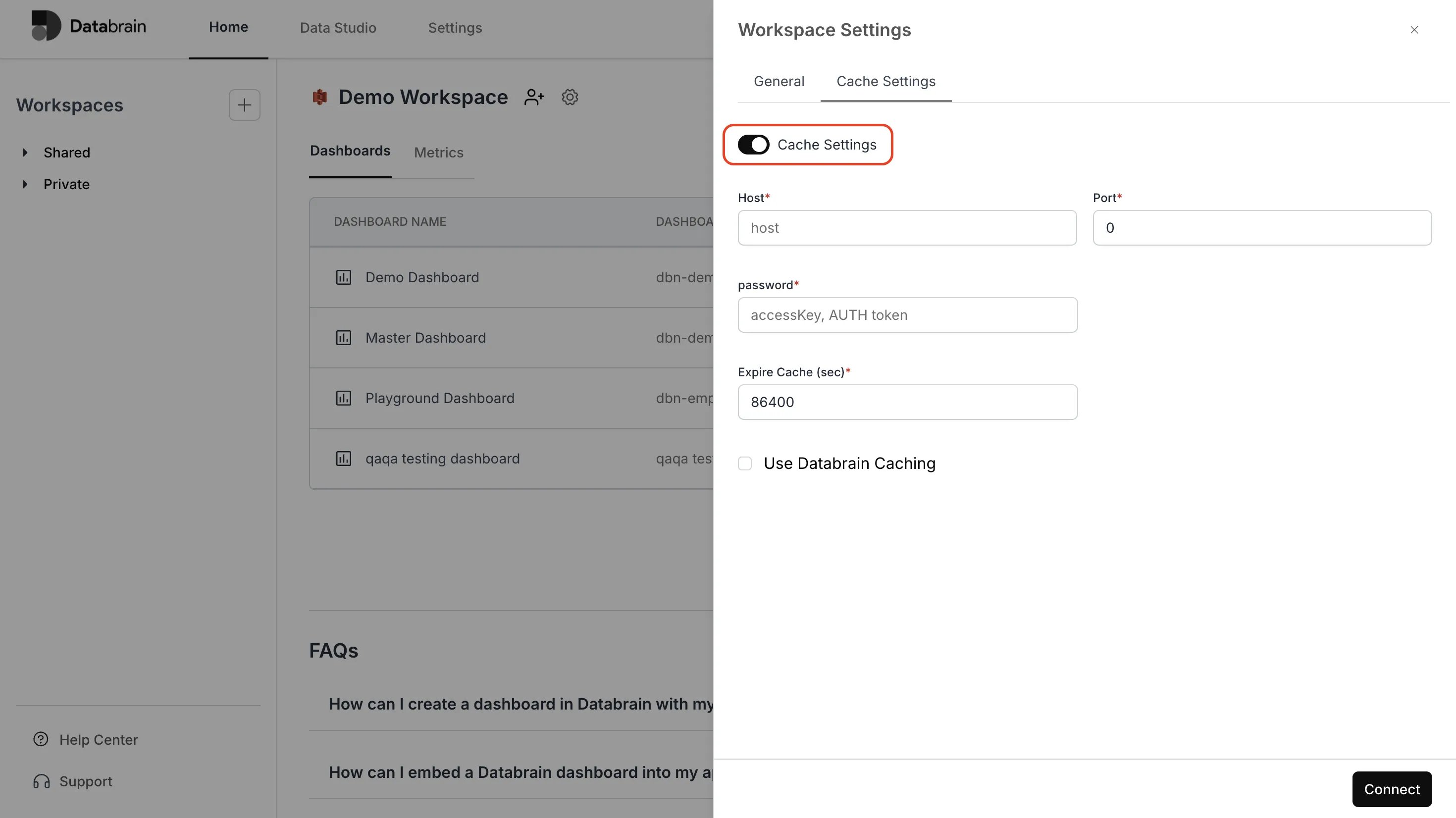
Settings
How Caching Works
When caching is enabled, this is the query execution flow:1
User requests a dashboard or metric
A query is generated based on the metric definition, applied filters, and row-level security rules.
2
Cache lookup
DataBrain checks the configured Redis instance for a cached result matching the query.The cache key includes:
- Database name
- Datasource ID
- Generated SQL query
- Applied filters
- Workspace ID
3
Cache hit → return cached result
If a matching cached result exists and has not expired, it is returned immediately — no database query is executed.
4
Cache miss → execute query and cache result
If no cache entry exists (or it has expired), DataBrain executes the query against your database. Successful results are cached with the configured TTL for future requests.
Graceful Degradation
If the Redis connection fails or times out (5-second connection timeout), DataBrain does not block the query. The query executes directly against your database and results are returned without caching. Cache errors are logged but never prevent dashboard functionality.TTL Recommendations
Choose a cache expiration based on your data freshness requirements:BYOC Setup Guide
Prerequisites
- A running Redis 5.0+ or AWS Elasticache (Redis) instance
- Network connectivity from DataBrain’s cloud to your Redis instance
- Redis AUTH password (recommended for security)
Network Requirements
Your Redis instance must be accessible from DataBrain’s cloud over the network. DataBrain connects directly to the host and port you provide — there is no SSH tunneling or special proxy for Redis connections. To allow connectivity:- Whitelist DataBrain’s IP address in your Redis instance’s security group (see Allow Access to our IP for the current IP)
- Ensure your Redis port (default
6379) is open for inbound connections from DataBrain’s IP - If your Redis is in a private network that is not reachable from the public internet, contact DataBrain support to discuss connectivity options
TLS/SSL: The Redis client currently connects without TLS encryption. If your Redis instance requires encryption in transit, contact DataBrain support to discuss options.
Step-by-Step Setup
1
Provision your Redis instance
Set up a Redis instance that is reachable from DataBrain’s cloud. This could be:
- Redis Cloud (publicly accessible by default)
- Self-managed Redis on a public-facing server (e.g., EC2 with a public IP)
- AWS Elasticache (requires network configuration — contact support if your instance is in a private subnet)
2
Configure network access
Whitelist DataBrain’s IP address in your Redis instance’s security group or firewall rules:
- Inbound rule: Allow TCP on your Redis port (default
6379) from DataBrain’s IP - See Allow Access to our IP for the current IP address
3
Configure in DataBrain
- Go to Workspace Settings → Cache Settings
- Toggle Cache Settings to enabled
- Leave Databrain Caching disabled
- Enter your Host (e.g.,
my-redis.example.com) - Enter your Port (e.g.,
6379) - Enter your Access Key / AUTH Token
- Set Cache Expiration in seconds
- Click Save
4
Verify
DataBrain will automatically validate the connection by writing and reading a test key. If the save succeeds, your BYOC cache is active.Load a dashboard and check that subsequent loads are faster — the response metadata will show
"cached": true for cache hits.Cache Invalidation
DataBrain provides several ways to manage cached data:Self-Hosted Deployment
For self-hosted DataBrain deployments, Redis is configured via environment variables:Self-Hosted Configuration
Complete self-hosted deployment guide
Security
Security & Data Residency
Full security and data residency documentation
Frequently Asked Questions
What is the difference between DataBrain Caching and BYOC?
What is the difference between DataBrain Caching and BYOC?
DataBrain Caching uses a Redis instance managed by DataBrain. You don’t need to provision or manage any infrastructure — just enable it and set a TTL.Bring Your Own Cache (BYOC) lets you connect your own Redis or Elasticache instance. Cached data stays in your infrastructure, giving you full control over data residency, eviction policies, and scaling.
What data is cached?
What data is cached?
Only query results (JSON format) are cached. Cache keys include the query hash, datasource ID, filters, and workspace ID — ensuring tenant isolation. Dashboard definitions, metric configurations, and user data are never stored in Redis.
What happens if Redis goes down?
What happens if Redis goes down?
DataBrain degrades gracefully. If the Redis connection fails or times out, queries execute directly against your database. Users will experience slightly slower load times (no cache hits) but dashboards will continue to work. Cache errors are logged for monitoring.
Can different workspaces use different cache modes?
Can different workspaces use different cache modes?
Yes. Each workspace has independent cache settings. One workspace can use DataBrain Caching while another uses BYOC with a different Redis instance.
How do I know if caching is working?
How do I know if caching is working?
Load a dashboard, then reload it. The second load should be noticeably faster. The API response metadata includes a
"cached" field that indicates whether results came from cache.What Redis versions are supported?
What Redis versions are supported?
DataBrain uses the
ioredis client and is compatible with Redis 5.0 and above, including AWS Elasticache (Redis mode) and Redis Cloud.Does caching respect row-level security?
Does caching respect row-level security?
Yes. Cache keys include the full query (which already has RLS applied) plus filters and workspace ID. Different tenants with different RLS rules will have separate cache entries.